
Why a Dedicated Content Hub Beats Scattered Blog Posts
When you think about WordPress SEO, the instinct is often to sprinkle keywords into individual articles, but the true power lies in centralizing thematic authority through a well‑structured content hub that serves both users and crawlers as a single, cohesive destination; this approach transforms a loose collection of posts into a strategic asset that signals depth to search engines and reduces the need for redundant internal linking. By clustering related topics under one umbrella page, you create a semantic web that guides Google’s algorithms to understand the hierarchy and relevance of each piece, resulting in stronger topical relevance and a higher chance of earning featured snippets or knowledge panels. The hub also enhances user experience by presenting a clear pathway from broad overviews to granular details, which in turn lowers bounce rates, boosts dwell time, and ultimately feeds the ranking signals that keep your WordPress site ahead of the competition.
Designing the Hub Architecture with Gutenberg Blocks
Gutenberg’s block editor isn’t just a visual tool; it can be leveraged to build modular, SEO‑friendly layouts where each block represents a subtopic, a call‑to‑action, or a schema‑enhanced element, allowing you to maintain consistency across the hub while still customizing content for specific search intents; the key is to use reusable block patterns that embed heading tags, descriptive alt text, and schema markup without manual repetition. Pairing these blocks with a logical URL structure—such as /hub/primary-topic/subtopic/—creates a breadcrumb trail that search engines love and users find intuitive, especially when the slug hierarchy mirrors the content hierarchy you’ve designed in the editor. Remember to keep the hub’s navigation lean, using a mix of anchor links and a sticky table of contents that dynamically updates as you add new blocks, ensuring that both crawlers and visitors can skim the entire breadth of information without getting lost in a maze of pages.
Implementing Structured Data for Rich Results
One of the most underutilized assets in a WordPress content hub is structured data, which can be added via plugins or directly in Gutenberg’s HTML blocks to signal to Google that your content qualifies for rich snippets, FAQ panels, or even “How‑to” steps; by annotating each sub‑section with appropriate schema types—such as Article, FAQPage, or HowTo—you give search engines a clear blueprint for displaying your answers directly in the SERP, dramatically increasing click‑through rates. A practical tip is to start with the most valuable pages in your hub and embed JSON‑LD snippets that reference the hub’s main URL as the mainEntityOfPage, reinforcing the relationship between the hub and its components; tools like the Structured Data Testing Tool can validate your markup before you push it live. For deeper integration, consider linking to our guide on on‑page SEO pruning strategies, which walks through how to clean up old schema that might be conflicting with your new hub implementation.
Optimizing Core Web Vitals Within the Hub
Google’s Core Web Vitals—Largest Contentful Paint, First Input Delay, and Cumulative Layout Shift—are non‑negotiable ranking factors, and a content hub provides an ideal testing ground for performance tweaks because every sub‑page shares the same theme and assets, allowing you to measure impact at scale; start by auditing image sizes, deferring non‑essential scripts, and leveraging lazy loading on high‑resolution visuals that often accompany in‑depth guides. WordPress’s built‑in lazy‑loading feature can be complemented with a CDN that serves compressed assets from edge locations, reducing latency for visitors across the globe, while the use of native WebP images in Gutenberg blocks can shave precious milliseconds off LCP scores. Don’t overlook the power of server‑side caching plugins that generate static HTML for hub pages, delivering near‑instant render times and ensuring that the interactive elements you embed—like accordion FAQs or interactive charts—don’t cause layout shifts that would harm CLS.
Internal Linking Strategies That Amplify Authority
While external backlinks remain vital, internal linking within a content hub can be the hidden catalyst that propels lower‑ranking pages up the ladder; by strategically placing contextual links from high‑traffic hub pages to deeper articles, you distribute link equity throughout the site, signaling to Google that each sub‑page is an essential piece of the larger puzzle. Use descriptive anchor text that reflects the target page’s focus, and avoid generic phrases like “click here,” which dilute the SEO value; the anchor should naturally incorporate the target keyword while maintaining readability for humans. For a deeper dive into efficient link distribution, check out our piece on Zero‑Click SEO tactics, which reveals how internal signals can complement brand authority even when users don’t click through to your site.
International Reach Through Multilingual Hubs
Expanding your WordPress hub to serve multiple languages unlocks a new tier of organic traffic, but it requires careful planning to avoid duplicate content penalties; the best practice is to create separate hub pages for each language, each with its own URL—such as /es/hub/tema-principal/—and to link them using hreflang annotations that guide Google to present the appropriate version to users based on their locale. WordPress plugins like WPML or Polylang can automate much of the translation workflow, yet you must still curate each language’s content to reflect local search intent, cultural nuances, and region‑specific keywords, ensuring the hub remains authoritative in every market. Additionally, consider customizing schema markup for each locale, as Google’s rich result algorithms may weigh regional data differently, giving you a competitive edge in international SERPs.
Leveraging the Hub for Content Repurposing and Evergreen Growth
One of the most sustainable advantages of a content hub is its ability to act as a repository for evergreen material that can be refreshed, repurposed, and expanded over time without losing the SEO equity you’ve built; schedule quarterly audits to update statistics, replace outdated references, and add new sections that reflect emerging trends, then push those changes to the hub’s main page to signal fresh relevance to search engines. By integrating a version history table or a “last updated” badge, you also communicate transparency to readers, encouraging repeat visits and enhancing trust—a factor that indirectly influences rankings. This cyclical process of refinement ensures that your hub remains a living resource, continuously attracting backlinks, social shares, and organic traffic long after the original articles have been published.
Measuring Success: Metrics That Matter for Hub Performance
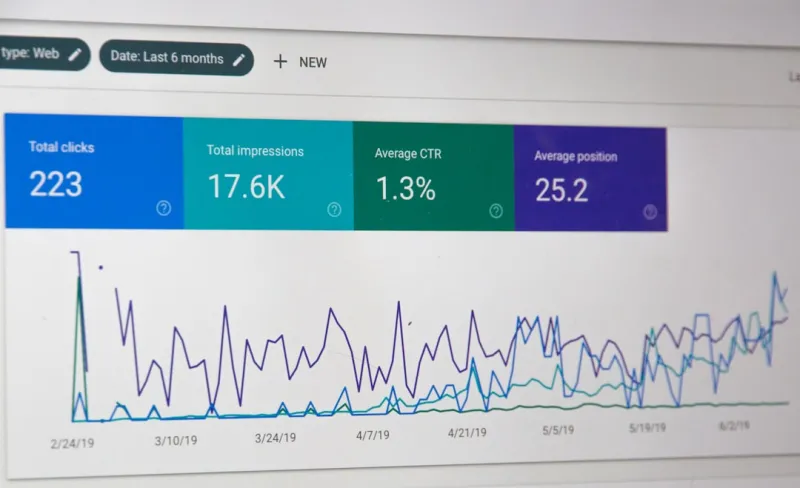
To confirm that your WordPress content hub is delivering the expected SEO lift, focus on a blend of macro and micro metrics: organic impressions, average position, click‑through rate, and the number of pages indexed under the hub’s URL hierarchy give you a high‑level view, while deeper analysis of dwell time, scroll depth, and internal navigation paths reveals how users engage with the hub’s structure; tools like Google Search Console and Google Analytics can be configured to segment traffic by hub pages, allowing you to spot content gaps and identify which sub‑topics are resonating most. Set concrete goals—for example, a 20% increase in pages per session for hub visitors within three months—and track them against a baseline, adjusting internal linking, schema, or content depth as needed to fine‑tune performance. Remember that SEO is a marathon, not a sprint; the true measure of a successful hub is its ability to sustain and grow authority over time, becoming the go‑to reference for both users and search engines in your niche.

Melanie Wilson, Freelance writer with a flare for everything. I am passionate about topics I write crafting stories and compelling content that connect with audiences. Journeying through the realms of creativity as a freelance creator. #WriterLife #ContentCreator
Related Posts

Gutenberg‑First SEO: Boost WordPress Rankings with Blocks
Discover why Gutenberg is more than a visual editor—its block-level semantics, lazy‑loading, and... Read More
The Hidden SEO Goldmine in WordPress Taxonomies
Learn a fresh SEO strategy for WordPress: use taxonomies to create structured content hubs, improve ... Read More
Why Gutenberg Is the Secret Weapon for WordPress SEO Success
Learn how to turn WordPress’s block editor into a powerful SEO engine with semantic hierarchy, nat... Read More
Top Posts

The Art of Content Pruning: Revitalize Your WordPress SEO for SaaS Growth
Discover a data‑driven, step‑by‑step approach to content pruning on WordPress that helps SaaS companies eliminate dead pages, consolidate assets, and refr...Read More

When Google’s Core Updates Meet SaaS Release Cycles
A deep dive into the interplay between Google’s algorithmic shifts and SaaS product releases, offering actionable tactics to future‑proof content, harness s...Read More

Community‑First Maps: The Hidden Engine Behind Local SEO Success
Learn a fresh, community‑centric approach to local SEO that goes beyond citations, using map optimization, neighborhood partnerships, and hyper‑local conten...Read More
Riding the 2024 Google SEO Wave: Rose DesRochers’ Insider Playbook for Dominating the SERPs
Rose DesRochers reveals the 2024 SEO playbook, covering AI‑assisted content, Core Web Vitals, semantic clusters, and trust‑focused link building to help you...Read More
0 Comments
Post Comment
You will need to Login or Register to comment on this post!