
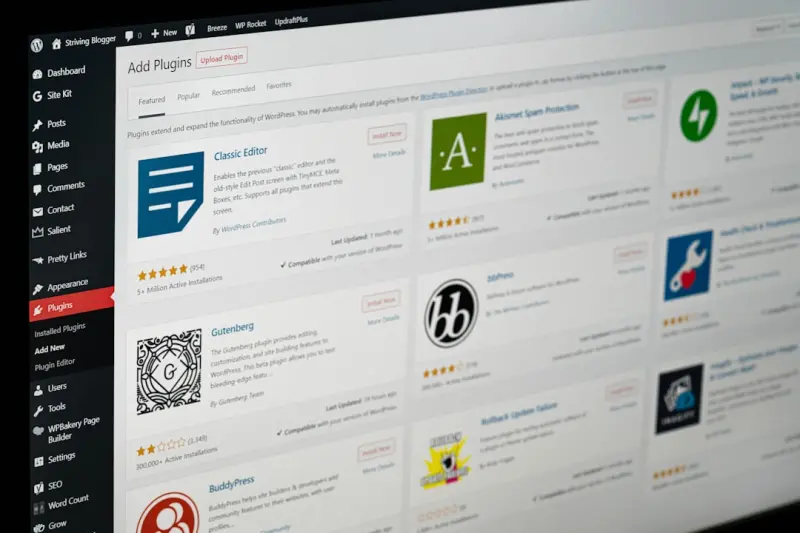
Why Gutenberg is the Secret Weapon for WordPress SEO Success
When I first dipped my toes into the WordPress sea, I thought SEO was all about plugins, keywords, and backlinks. Years later, after countless site migrations and a handful of broken link nightmares, I realized the real power sits in the editor itself. Gutenberg, the block‑based editor that debuted a few releases ago, isn’t just a pretty UI—it’s a strategic SEO platform waiting to be leveraged.
In this post I’ll walk you through the exact ways you can turn Gutenberg from a content sandbox into a ranking engine. We’ll explore semantic block structuring, built‑in schema support, performance‑first image handling, and even how to automate SEO checks without breaking the creative flow. By the end, you’ll see why the block editor is the missing piece of your WordPress SEO puzzle.
1. Semantic Block Hierarchy = Better Crawlability
Search engines love clear, hierarchical content. Traditional classic editors left us with a monolithic HTML blob, forcing crawlers to guess the intent behind headings, lists, and sections. Gutenberg, however, gives you granular control over each element’s semantic role.
- Heading blocks automatically render
<h1>through<h6>tags based on the block’s settings, ensuring a logical document outline. - Paragraph blocks keep text clean and free from hidden inline styles that can bloat the DOM.
- Group and Columns blocks let you visually segment content while preserving semantic nesting—perfect for “FAQ” or “How‑to” sections that Google loves to feature.
To audit your block hierarchy, open the Code editor view (Ctrl + Shift + Alt + M). Look for a clean, indented structure—no stray <div> wrappers or inline style attributes. A tidy hierarchy not only helps crawlers but also improves accessibility, a factor that Google’s algorithms increasingly weigh.
2. Schema Made Simple: The Schema Block Revolution
Structured data used to require hand‑coding JSON‑LD or wrestling with third‑party plugins. Gutenberg now ships with a native Schema block that lets you select from common types—Article, FAQ, Product, Event—right inside the editor. When you drop a Schema block onto a page, it injects the appropriate JSON‑LD script automatically, keeping your markup valid and up‑to‑date.
Why does this matter? Because Google’s rich results are the fastest way to jump from the dark pool of SERPs into the spotlight. A well‑implemented FAQ schema, for example, can land you a coveted position zero answer box, driving clicks without any extra ad spend.
If you’re still skeptical, take a look at Structured Data: The SaaS SEO Game‑Changer You’ve Overlooked. The principles apply equally to WordPress, but Gutenberg hands you the implementation toolbox with a few clicks.
3. Image Optimization Without the Plugin Overhead
Images are the silent killers of page speed, especially on WordPress sites bloated with heavy media libraries. Gutenberg’s Image block now includes native lazy‑loading, responsive srcset generation, and optional WebP conversion via the core media library.
Here’s a quick checklist to squeeze every last millisecond out of your visuals:
- Upload at the right size. Gutenberg will automatically generate the
srcset, but start with an image no larger than 2 × the maximum display width. - Enable “Loading=lazy”. This is now default, but double‑check the block settings under “Advanced”.
- Serve WebP. If your host supports it, toggle the “Convert to WebP” option in the Media Settings screen.
- Add descriptive
alttext. Not just for SEO—screen readers depend on it.
When images load faster, your Core Web Vitals improve, and you’ll see a direct uplift in rankings. The best part? You achieve this without installing a separate optimizer plugin, keeping your site lean and secure.
4. Automating SEO Checks with Block Patterns
One of the biggest friction points for content teams is the back‑and‑forth with SEO reviewers. To streamline this, you can create custom Block Patterns that embed SEO best practices right into the template.
For instance, build a “Blog Post Starter” pattern that includes:
- A pre‑filled
Headingblock for the title. - An
Excerptblock with a character count reminder. - A
Schemablock set to “Article”. - A
Featured Imageplaceholder with recommended dimensions. - A
Readability Checklistblock that pulls in a short guide (you can embed a reusable block that lists keyword density, transition words, passive voice checks).
When writers start a new post, they’re handed a SEO‑ready scaffold, dramatically cutting the review loop. The pattern lives in the block‑patterns folder of your theme, so it’s portable across all of your sites.
5. Harnessing the Power of Reusable Blocks for Internal Linking
Internal linking is still a cornerstone of SEO, but the manual process is tedious. Gutenberg’s Reusable Blocks turn this into a repeatable system. Create a “Related Posts” block that pulls in up to five links based on a custom taxonomy you define (e.g., “Topic”). Insert the reusable block at the end of every article, and you have a dynamic, context‑aware internal linking module that updates automatically as you publish new content.
This approach also ties into the insights from Strategic Internal Linking for Massive eCommerce Catalogs, where a structured internal link hierarchy boosted crawl efficiency and equity flow. The same principles apply to a content‑rich blog, just with a more editorial focus.
6. Content Personalization with Block Visibility Controls
WordPress now supports block visibility conditions—show or hide a block based on user role, device type, or even query parameters. While this isn’t a direct ranking factor, it allows you to tailor the on‑page experience without creating separate landing pages.
Imagine serving a “Free Trial” CTA only to logged‑out visitors, while showing a “Dashboard Overview” block to existing customers. This reduces bounce rates for each audience segment, sending a positive signal to search engines that the page satisfies user intent.
7. Future‑Proofing with Headless WordPress and Gutenberg
The industry buzz around headless architectures often paints WordPress as a relic, but Gutenberg changes the narrative. Because Gutenberg stores content as JSON (the block attribute), you can easily expose it via the REST API to any front‑end framework—React, Vue, or even a static site generator.
When you decouple, you retain the SEO benefits of Gutenberg’s structured blocks while gaining the performance perks of a static or JAMstack front end. Your JSON‑LD schema stays intact, and you can still use the same SEO plugins on the backend for meta tags and sitemap generation.
8. Monitoring Block‑Level SEO Health with Log Insights
Even the most polished block architecture can hide hiccups—duplicate headings, missing alt attributes, or broken schema. Instead of eyeballing each page, feed your server logs into a simple analytics pipeline (Google Cloud Logging, Elastic, or even a lightweight logwatch script).
Set up alerts for patterns like “Schema block missing on POST /blog/*” or “Image block without alt attribute”. When an anomaly spikes, you have a precise location (the block ID) to fix, saving hours of manual QA.
9. The Human Touch: Writing for Both Bots and Readers
All the technical wizardry in Gutenberg won’t matter if the copy feels robotic. My mantra remains: write for a person, then optimize for the bot. Use the block editor’s Paragraph and Heading blocks to naturally break up content, add Quote blocks for authority, and sprinkle in List blocks for scannability.
When you combine a clear visual hierarchy with the semantic advantages we discussed, you give Google a crystal‑clear signal about your page’s purpose—while delivering a delightful reading experience.
10. Quick Action Checklist
- Audit existing posts for block hierarchy; fix heading order where needed.
- Replace legacy schema plugins with the native Schema block.
- Enable lazy loading and WebP on all Image blocks.
- Create a “Blog Post Starter” block pattern that includes SEO scaffolding.
- Build a reusable “Related Posts” block to automate internal linking.
- Implement block visibility rules for personalized CTAs.
- Consider a headless front‑end if you need ultra‑fast load times.
- Set up log‑based alerts for missing schema or alt attributes.
- Continuously test page speed and Core Web Vitals after changes.
Gutenberg isn’t just a content editor—it’s a living, breathing SEO framework that, when wielded correctly, can push your WordPress site from the middle of the pack to the front of the SERP. The next time you open the block inserter, think of each block as a micro‑SEO decision. Stack them wisely, and you’ll watch rankings climb without the endless cycle of plugin‑driven tinkering.

Jim Pearse, a seasoned freelance writer, brings a wealth of knowledge and passion to the world of home and garden. From the intricacies of landscaping to the nuances of interior design, Jim delves into every aspect of creating comfortable, beautiful, and functional living spaces.
Related Posts

Turning Community Signals into SEO Fuel on WordPress
Discover actionable tactics to turn community interactions—comments, reviews, user‑generated ima... Read More

Unlocking SEO Superpowers with WordPress Custom Post Types
A deep dive into leveraging WordPress custom post types and taxonomies for SEO, with practical steps... Read More
Headless WordPress SEO: How to Keep Rankings Soaring in a Decoupled Architecture
A practical guide to preserving and enhancing SEO after migrating WordPress to a headless architectu... Read More
Top Posts

Navigating Google’s AI‑First SERP: Strategies for the Search Generative Experience
Learn practical tactics to optimize for Google’s AI‑driven Search Generative Experience, from intent clusters to schema markup, and future‑proof your rank...Read More

Beyond Keywords: Mastering Visual Search SEO
Learn the essentials of visual search SEO—from image sitemaps and AI‑generated alt text to emerging AR opportunities—so your content can rank in image‑f...Read More

Supercharge Your Brand’s Visibility: A Tactical Guide to Facebook Page SEO
Discover a step‑by‑step guide to optimizing your Facebook Page for Google search, from clean URLs and keyword‑rich bios to leveraging reviews and structur...Read More

Strategic Seasonal SEO Roadmaps: How to Capture Search Peaks for eCommerce Growth
This guide outlines a comprehensive, seasonal SEO strategy for eCommerce brands, covering demand mapping, content buckets, technical optimization, internal link...Read More
0 Comments
Post Comment
You will need to Login or Register to comment on this post!