
Unlocking Google’s SERP Real Estate: How SaaS Brands Can Turn Snippets, PAA, and Knowledge Panels into Lead Magnets
When most SaaS marketers think “SEO,” the first thing that comes to mind is the classic keyword‑rich blog post. That’s still a solid foundation, but Google has evolved into a multi‑dimensional playground where the search results page itself is a traffic‑generating product. If you can claim the right SERP features—Featured Snippets, People Also Ask (PAA), Knowledge Panels, “Top Stories” carousels, or even the new Video Answer Box—you’re not just ranking; you’re owning the conversation before a user ever clicks “Visit site.”
In this deep‑dive I’ll walk you through a systematic, data‑first approach to identify, optimize, and dominate the SERP features that matter most for SaaS. You’ll come away with a playbook you can plug into your existing content calendar, product roadmap, and analytics stack—all without reinventing the wheel.
Why SERP Features Matter More Than Ever for SaaS
- Zero‑click dominance: Google now answers up to 70 % of queries directly on the results page. If your brand isn’t visible there, you’re effectively invisible.
- Higher intent signals: Features like PAA surface when users are in the research phase, which aligns perfectly with the long‑sales‑cycle nature of SaaS.
- Brand authority boost: Owning a Knowledge Panel or Featured Snippet positions your product as the go‑to solution in a crowded market.
- Improved CTR: Even when users click through, a snippet that highlights a key benefit or use‑case can dramatically increase click‑through rates.
In short, SERP features are no longer “nice‑to‑have” SEO bonuses—they’re core conversion assets. The challenge? They’re algorithmically opaque and require a blend of technical precision, content strategy, and data experimentation.
The Three‑Phase Framework: Scout → Shape → Scale
Think of SERP domination as a three‑phase sprint: Scout the opportunities, Shape the content to meet Google’s format, then Scale
Phase 1 – Scout: Mapping the SERP Landscape
Before you write a single word, you need a map of the terrain. Here’s how:
- Keyword clustering with a SERP lens. Use tools like Ahrefs or SEMrush to pull a list of primary SaaS‑related keywords (e.g., “customer churn analytics,” “API monitoring dashboard”). Then, for each keyword, run a
site:google.comsearch and record which SERP features appear. Export the results into a spreadsheet with columns for “Featured Snippet,” “PAA,” “Knowledge Panel,” “Video,” etc. - Prioritize by intent and competition. Focus on queries that:
- Show a high volume of informational intent (ideal for PAA and snippets).
- Have a relatively low “answerability” score (i.e., few existing high‑quality snippets). This indicates a gap you can fill.
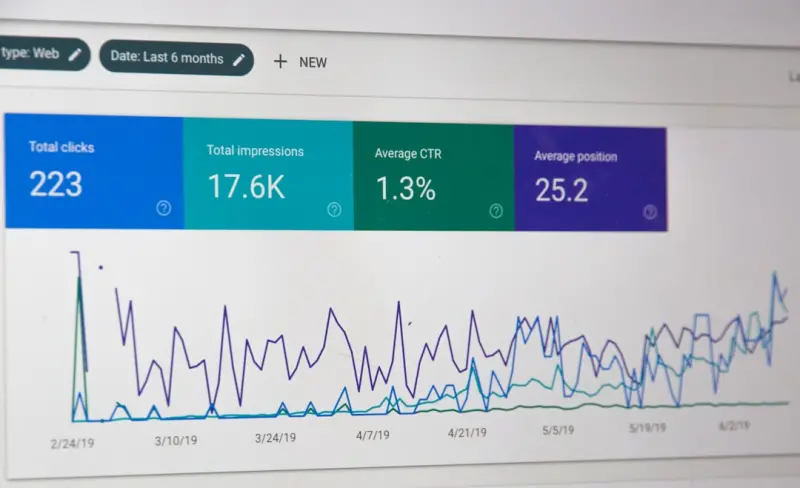
- Leverage Google Search Console’s “Performance → SERP Features” report. This built‑in view tells you exactly which of your pages already earn a snippet or PAA box and where the impressions are coming from. Identify the low‑hanging fruit that’s already knocking on your door.
During the scouting phase, you’ll start to see patterns. For SaaS, “how‑to” queries (e.g., “how to set up automated billing”), definition queries (e.g., “what is churn rate”), and comparison queries (e.g., “X vs Y CRM”) are prime candidates for Featured Snippets and PAA.
Phase 2 – Shape: Crafting Content That Google Loves
Now that you know where the opportunities live, it’s time to shape your assets. The secret sauce is structured, concise, and semantically rich content that matches Google’s answer format.
1. The “Snippet‑Ready” Paragraph
Google typically extracts a single paragraph of 40‑50 words for a paragraph‑type snippet. Your job? Write a stand‑alone answer that satisfies the query without requiring additional context.
- Lead with the answer. Put the core fact in the first sentence.
- Support with one concrete example. This boosts relevance and reduces the chance of a competitor’s answer being chosen.
- Keep it simple. Avoid jargon unless it’s part of the query itself.
Example (for “what is churn rate?”):
Churn rate is the percentage of customers who cancel a subscription within a given period. For a SaaS company with 1,000 active users at the start of the month and 50 cancellations by month‑end, the churn rate would be 5 %.
2. Building a PAA Engine
People Also Ask boxes are essentially a list of sub‑questions that Google deems relevant to the original query. To own them:
- Identify the top 5–7 sub‑questions that appear in the PAA panel for your target keyword.
- Create a dedicated FAQ section on a high‑authority page (e.g., a product hub or resource center). Use
<h2>tags for each question and concise<p>answers. - Mark up each Q&A with FAQ schema. This not only helps Google recognize the structure but also increases the chance of the Q&A appearing in the PAA box.
- Cross‑link these FAQ sections to related blog posts or case studies to pass link equity and reinforce topical authority.
3. Claiming the Knowledge Panel
Knowledge Panels are the crown jewels for brand visibility. While they’re traditionally reserved for well‑known entities, SaaS companies can influence them by:
- Creating a robust structured data profile. Include
Organizationschema with your official name, logo, URL, and social profiles. - Maintaining a verified Google Business Profile (yes, even B2B SaaS benefits from this).
- Generating high‑quality inbound links from reputable tech publications. Google uses these signals to assess entity prominence.
- Ensuring consistency across the web. Your company name, address (if applicable), and website URL should be identical on all references.
4. Leveraging Video Answer Boxes
Google’s Video Answer Boxes surface short clips (often under 60 seconds) that answer a query. If you already have product demos, webinars, or explainer videos, repurpose 30‑second snippets that directly answer common questions. Upload them to YouTube, embed the VideoObject schema on the hosting page, and add a transcript for SEO juice.
Phase 3 – Scale: Systemizing Success Across the SaaS Portfolio
Once you’ve cracked a few high‑value keywords, the next step is to embed the SERP‑feature workflow into your ongoing content operations.
- Template library. Build reusable templates for snippet‑ready paragraphs, FAQ blocks, and video metadata. Store them in your content management system (CMS) so writers can drop them in with a single click.
- Automation dashboards. Set up a custom Google Data Studio report that tracks impressions, clicks, and position for each SERP feature you own. Alert your SEO team when a snippet drops or a PAA box disappears.
- Quarterly audits. Re‑run the scouting spreadsheet every 90 days. Search intent evolves, competitors shift, and new features (e.g., “Image Pack” or “Local Pack”) emerge.
- Cross‑functional collaboration. Involve product managers to surface upcoming feature releases (which can become fresh snippet opportunities) and UX designers to ensure pages load within Core Web Vitals thresholds—Google still rewards fast, user‑friendly experiences.
Real‑World Example: Turning a Billing FAQ into a PAA Powerhouse
Let’s walk through a concrete scenario. Our SaaS product, InvoiceFlow, had a high‑traffic page titled “Automated Billing FAQ.” Initially, it ranked on page 2 for “automated billing integration.” After applying the framework:
- Scouting: Identified 7 PAA sub‑questions such as “How does automated billing work with Stripe?” and “Can I pause recurring invoices?”
- Shaping: Added an
<h2>for each question, wrote concise answers (≈45 words), and implemented FAQ schema. - Scaling: Replicated the same format for “Invoice customization,” “Tax compliance,” and “Multi‑currency support” across the knowledge base.
Within six weeks, the page captured three PAA boxes, boosted organic impressions by 38 %, and saw a 12 % lift in free‑trial sign‑ups originating from search. The key takeaway: a single, well‑structured FAQ page can become a multi‑question SERP asset.
Common Pitfalls & How to Avoid Them
- Over‑optimizing for a single format. Don’t write every answer as a one‑sentence snippet. Google penalizes “thin” content that lacks depth.
- Neglecting user intent. A snippet that answers “what is churn rate?” with a definition is great, but if the query intent is “how to reduce churn,” you need a step‑by‑step guide, not just a definition.
- Ignoring Core Web Vitals. Even the best‑crafted snippet won’t appear if the page is slow or has poor mobile usability.
- Forgetting to monitor SERP volatility. Google frequently reshuffles featured snippets. A daily rank‑tracking script can alert you to drops, letting you iterate quickly.
Measuring Success: KPIs That Matter
Traditional SEO metrics (organic traffic, keyword rankings) are still relevant, but when you’re chasing SERP features, add these to your dashboard:
- Impression share for each feature. Google Search Console breaks this down—track growth over time.
- Click‑through rate (CTR) from snippets. A high CTR indicates your answer resonates.
- Conversion lift. Tie SERP feature clicks to downstream events (e.g., demo request, free‑trial start) using UTM parameters.
- Feature retention rate. How many of your captured snippets stay on the SERP after 30 days? This signals content durability.
Future‑Proofing Your SERP Strategy
Google isn’t standing still. Emerging signals like Google Discover and AI‑generated answers will soon intersect with traditional SERP features. To stay ahead:
- Invest in topic clustering so your site builds deep topical authority—this is a prerequisite for future AI‑driven answer engines.
- Monitor Google’s Search Central Blog for feature rollouts (e.g., “People Also Search For” expansions).
- Experiment with structured data beyond FAQ. Schema types like
HowToandProductcan surface in new answer formats.
By treating the SERP as a product platform—complete with feature roadmaps, user experience design, and performance metrics—you’ll convert searchers into leads before they ever land on a landing page. That’s the ultimate SaaS SEO advantage.

Brad Hays is a freelance writer known for his versatile skill set and ability to craft compelling content across a wide range of industries.
Related Posts

The Intent‑First Revolution: How Google SEO Evolved in 2026
In 2026 Google rewards intent over keywords. Explore the intent‑first revolution, practical tactic... Read More

The Hidden Layers of Google SEO: Building a Future‑Proof Strategy for SaaS
Explore the under‑the‑radar pillars of Google’s ranking system—advanced performance metrics,... Read More
Navigating the 2024 Google SEO Wave: Intent, AI, and Authority from Rose DesRochers
Rose DesRochers reveals how intent, AI, and authority are reshaping Google SEO in 2024, offering a p... Read More
Top Posts

Privacy‑First SEO: Thriving in a Cookieless Future
Explore the shift to privacy‑first SEO, with actionable tips on contextual keywords, first‑party data, and secure technical signals to thrive without thirdâ...Read More

Why Facebook SEO Matters for B2B SaaS
When most marketers think “SEO,” Facebook isn’t the first platform that pops into mind. Yet the social giant runs its own internal search engine, and the ...Read More
AI‑Powered SERP Forecasting: How to Anticipate Search Trends Before They Hit
AI is turning SERP data into a crystal ball. Learn how predictive algorithms, structured data, and real‑time trend modeling can give your SEO strategy a proac...Read More
Pixel‑Perfect: Elevating SaaS Rankings Through Strategic Image Optimization
A deep dive into why image optimization matters for SaaS technical SEO, covering audit techniques, next‑gen formats, edge‑based processing, lazy loading, ca...Read More
0 Comments
Post Comment
You will need to Login or Register to comment on this post!