

Why Content Pruning Is the Hidden SEO Lever Most WordPress Sites Miss
When I first dove deep into WordPress SEO, I was dazzled by the endless checklist of plugins, schema snippets, and keyword research tools, yet the quiet power of content pruning lingered in the shadows, waiting for a site owner to notice the weight of stale pages dragging down overall relevance; each orphaned article, outdated product review, or thin blog post not only clutters the crawl budget but also signals to Google that the site may be neglected, eroding trust and authority over time. In practice, pruning means systematically evaluating every piece of content, asking hard questions about purpose, performance, and user intent, then deciding whether to delete, consolidate, or revitalize—an approach that aligns perfectly with Google’s emphasis on expertise, authority, and trustworthiness. By treating pruning as an ongoing maintenance ritual rather than a one‑off project, you transform your WordPress installation into a lean, high‑signal ecosystem where each URL earns its place in the index, and search engines reward the site with improved crawl efficiency and higher rankings.
Step 1: Conduct a Data‑Driven Content Audit Using Built‑In WordPress Tools
The first concrete move is to pull a comprehensive list of every post, page, and custom post type straight from the WordPress database; tools like WP‑CLI or the native Export feature can generate a CSV that you then feed into a spreadsheet where you enrich each row with metrics such as organic traffic, bounce rate, average time on page, and backlinks—data points that reveal which assets are truly adding value and which are just dead weight. I recommend sorting the list by organic impressions from Google Search Console, then flagging anything below a modest threshold (for many sites, fewer than 100 impressions per month) as a candidate for further review; from there, cross‑reference with internal linking reports to ensure you’re not unintentionally breaking navigation paths, and use the SEO‑ready Gutenberg blocks to quickly visualize content gaps in the audit sheet. This data‑first mindset prevents guesswork, ensures you focus effort where it matters most, and sets the stage for a surgical pruning operation that respects both user experience and search engine expectations.
Step 2: Identify and Eliminate Thin or Duplicate Content
Thin content—pages with fewer than 300 words, minimal engagement, or no unique value proposition—has become a red flag for Google’s algorithms, especially after the semantic updates that favor depth and context; therefore, once your audit highlights low‑performing URLs, examine each for opportunities to either merge with a more comprehensive article or enrich with additional sections, media, and internal links that elevate its substance. Duplicate content, whether caused by pagination issues, similar product descriptions, or syndicated posts, can dilute keyword relevance and split link equity, so leverage plugins like Yoast SEO or the built‑in canonical tag settings to point search engines toward the preferred version before you decide to delete the redundant copies. In both scenarios, the goal is not merely to reduce page count but to amplify the overall topical authority of your site, ensuring that every remaining page stands as a robust answer to a specific user query, thereby aligning with Google’s intent‑focused ranking philosophy.
Step 3: Refresh Evergreen Content to Reclaim Lost Rankings
Instead of discarding all underperforming posts, I often discover hidden gems—evergreen topics that once ranked well but have slipped due to outdated statistics, broken links, or shifting user intent; a strategic refresh involves updating headlines with fresh keyword research, inserting new data points, and re‑optimizing headings using semantic variations that reflect current search language, a tactic that mirrors the principles outlined in the semantic revolution. While you’re at it, add relevant internal links to newer articles, replace old images with modern, WebP‑encoded versions that improve page load speed, and rewrite meta descriptions to be more compelling, all of which signal to Google that the page has been actively maintained. This revitalization process not only breathes new life into existing assets but also preserves any inbound link equity, turning what could have been a deletion into a potent SEO win.
Step 4: Consolidate Related Articles Through Strategic Canonicalization and Redirects
When multiple posts cover overlapping subtopics—think “how to choose a WordPress theme” and “best WordPress themes for bloggers”—it’s smarter to consolidate their insights into a single, authoritative pillar page; you then set up 301 redirects from the redundant URLs to the new hub, ensuring that users and crawlers are seamlessly guided to the comprehensive resource while preserving the accumulated link juice. In WordPress, the Redirection plugin or native .htaccess rules make this process painless, and you can use the canonical tag on the pillar page to inform Google that it is the definitive source for that cluster of keywords, preventing any accidental duplicate content issues. This approach not only streamlines site architecture, making it easier for search engines to crawl and index, but also enhances user experience by reducing the number of fragmented articles a visitor must navigate to find the answer they need.
Step 5: Optimize Metadata and Structured Data on the Remaining Pages
After pruning, the next critical layer is to audit title tags, meta descriptions, and schema markup across the surviving URLs; even a well‑written article can underperform if its SERP snippet fails to attract clicks, so I recommend revisiting each piece to embed primary keywords naturally in the title and craft compelling, concise meta descriptions that stay within Google’s pixel limits. For WordPress sites, the structured data strategies post outlines how to add JSON‑LD for articles, FAQs, and breadcrumbs, which not only enriches search listings but also reinforces topical relevance, especially after you’ve consolidated content and removed noise. By ensuring that every remaining page is perfectly packaged for both crawlers and users, you maximize the impact of the leaner site architecture created through pruning.
Step 6: Leverage WordPress’s Native Sitemap and Crawl Budget Controls
With a trimmed content inventory, you can now fine‑tune the XML sitemap generated by WordPress (or an SEO plugin) to include only the high‑value URLs, removing any low‑traffic or noindex pages that would otherwise waste crawl budget; this is especially vital for larger sites where Google allocates a finite number of crawl requests per day, and a cleaner sitemap signals a more focused site structure. Additionally, use the robots.txt file to disallow admin, login, and any legacy directories, and consider setting the “Search Engine Visibility” option in Settings → Reading to discourage indexing of private content. These technical tweaks, combined with the reduced page count from pruning, give Google a clearer roadmap, accelerate indexation of fresh content, and ultimately improve the site’s overall crawl efficiency.
Step 7: Measure Impact and Iterate with Continuous Monitoring
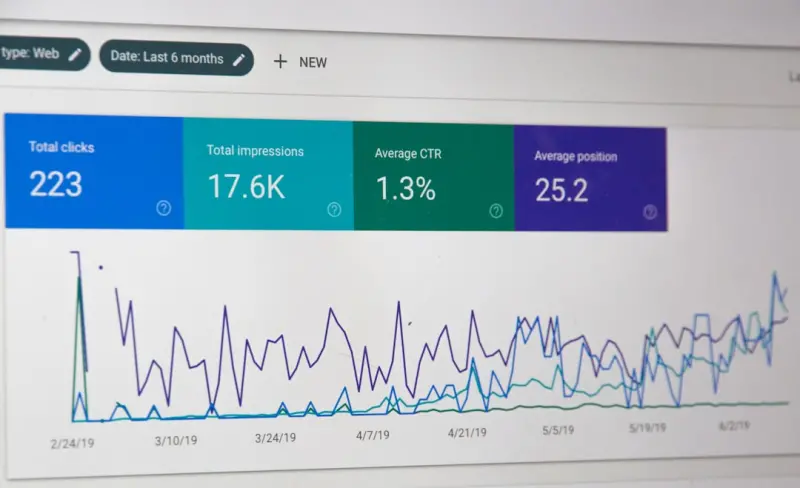
Post‑pruning, it’s essential to establish a baseline of key performance indicators—organic traffic, average position, click‑through rate, and crawl stats—then monitor changes over a 30‑ to 60‑day window using Google Search Console and analytics platforms; you’ll often see a short‑term dip as Google reprocesses the sitemap, but the long‑term trend typically shows higher click‑throughs and better rankings for the remaining, stronger pages. Set up automated alerts for sudden traffic drops on any page, which may indicate a broken redirect or an unintended de‑indexing, and be prepared to quickly revert or adjust. This iterative mindset turns pruning from a one‑off cleanup into a sustainable SEO habit, ensuring that your WordPress site remains agile, authoritative, and primed for future algorithmic shifts.
Conclusion: Turn Pruning Into a Competitive Advantage
In the ever‑evolving landscape of WordPress SEO, many practitioners chase the newest plugin or the flashiest schema type, but the real competitive edge often lies in the discipline of removing what no longer serves your audience or search engines; by adopting a systematic, data‑driven pruning workflow, you not only reclaim crawl budget and strengthen topical authority but also create a more enjoyable experience for visitors who find concise, relevant answers without wading through outdated content. As you embed pruning into your regular site maintenance calendar—quarterly audits, seasonal refreshes, and post‑campaign cleanups—you’ll notice a steady climb in rankings, higher user engagement, and a healthier backlink profile that reflects a site worth linking to. Embrace the paradox: less can truly be more, and in the world of WordPress SEO, a leaner site often outranks a cluttered one.

Deb Roberts is a freelancer who writes on various subjects, bringing versatility and depth to her work. Alongside her broad writing expertise, she has a special passion for horses.
Related Posts
Headless WordPress SEO: Future‑Proofing Your Rankings
Discover a practical roadmap for maintaining and enhancing SEO in a headless WordPress setup, from c... Read More

Unlocking WordPress FAQ Schema: A Hands‑On Guide to Structured SEO Success
Discover a practical, hands‑on approach to adding FAQ schema in WordPress, turning everyday questi... Read More

Turning WordPress Site Speed into a Ranking Superpower
Learn how to make your WordPress site lightning‑fast, boost rankings, and keep visitors engaged wi... Read More
Top Posts

Facebook Groups: The Untapped SEO Engine for SaaS Growth
Learn why Facebook Groups are a powerful, often overlooked SEO asset for SaaS marketers, and get a step‑by‑step guide to turning group discussions into ever...Read More

The SEO Edge of WordPress Taxonomies and Custom Types
Taxonomies are more than simple categories—when strategically designed and optimized, they become powerful SEO assets that clarify site hierarchy, generate ra...Read More

Turn Customer Reviews and Q&A Into SEO Gold for Your eCommerce Store
User‑generated content is more than social proof—it’s a goldmine for SEO. Discover step‑by‑step tactics to leverage reviews, Q&A, and customer ima...Read More

Seeing the Sale Before the Click: How Visual Search is Redefining eCommerce SEO
Visual search is reshaping eCommerce discovery. This guide shows how to build a visual taxonomy, name files, write alt text, use structured data, and serve fast...Read More
0 Comments
Post Comment
You will need to Login or Register to comment on this post!