
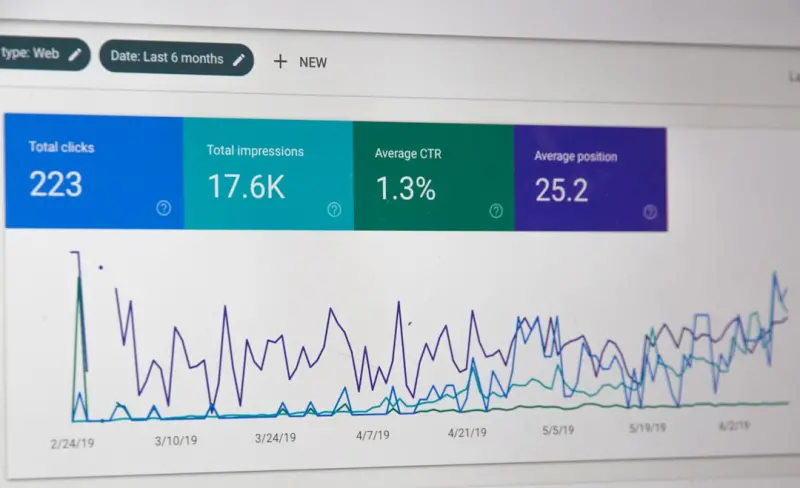
Why Image Optimization is the Unsung Hero of Technical SEO for SaaS
When most of us think about technical SEO, the first things that come to mind are crawl budgets, schema markup, or Core Web Vitals. Images, however, sit quietly in the background, often overlooked, yet they wield a disproportionate influence on page load, indexability, and ultimately, rankings. As a SaaS marketer who has spent countless hours dissecting JavaScript bundles and server logs, I’ve learned that a single poorly‑served image can erode the performance gains you’ve fought hard to achieve. This post dives deep into the why and how of image optimization, translating geek‑level tactics into a practical, SaaS‑focused playbook.
The SEO Ripple Effect of Every Kilobyte
Google’s ranking algorithm has evolved to reward user experience. While Core Web Vitals explicitly measure loading speed, interactivity, and visual stability, the underlying data points are rooted in raw page weight. An image that’s 500 KB larger than it needs to be doesn’t just add to the download size; it can:
- Increase First Contentful Paint (FCP), delaying the moment a visitor sees the value proposition of your product.
- Trigger Layout Shift if the image dimensions are not declared, harming the Largest Contentful Paint (LCP) metric.
- Consume crawl budget, especially on image‑heavy documentation or knowledge‑base pages, because Googlebot must fetch each asset before deeming a page “fully rendered.”li>
In a SaaS context, where demo videos, UI screenshots, and data visualizations pepper the site, the cumulative impact can be staggering.
Step 1: Audit Your Image Inventory with a Data‑First Lens
Before you can optimize, you need visibility. A quick crawl using tools like Screaming Frog or Sitebulb will surface every image URL, its file size, dimensions, and HTTP status. Export the data to a spreadsheet and add columns for:
- Current format (JPEG, PNG, GIF, SVG, WebP, AVIF)
- Pixel dimensions vs. displayed dimensions
- Cache‑Control header values
- Presence of
alttext andtitleattributes
From this matrix, you can prioritize “low‑hanging fruit” – images that are >150 KB, served at double the displayed size, or missing proper caching directives.
Step 2: Choose the Right Format for the Right Context
Not every image benefits from the newest formats. Here’s a quick decision tree:
- Photographic content (e.g., marketing hero images, product screenshots) →
WebPorAVIF. Both offer 30‑50 % size reduction over JPEG with comparable quality. - Icons, logos, and UI elements →
SVG. Vector graphics scale without pixelation, eliminating the need for multiple raster sizes. - Images with transparency (e.g., overlays) →
WebPif supported, otherwisePNG‑8for smaller footprints. - Animated graphics → Consider
APNGor lightweightGIF, but evaluate whether a short video (MP4) would be more efficient.
Modern browsers now support WebP and AVIF natively, and you can safely fall back to JPEG/PNG via the <picture> element.
Step 3: Automate On‑the‑Fly Conversion with Edge Functions
If your SaaS runs on a distributed architecture, you can offload image processing to the edge. Services like Cloudflare Workers, AWS Lambda@Edge, or Fastly Compute@Edge let you intercept image requests, resize, convert, and apply lossless compression in real‑time. Benefits include:
- Zero storage overhead – you never have to keep multiple size variants.
- Geographically optimized delivery, reducing latency for global users.
- Dynamic adaptation to device pixel ratios, ensuring the right resolution lands on the right screen.
While this sounds like a serverless use‑case, the focus here is the SEO payoff: faster response times, lower bounce rates, and a healthier crawl budget.
Step 4: Implement Lazy Loading Without Compromising Indexability
Native lazy loading (loading="lazy") is now standard in Chrome, Edge, and Safari. For SaaS pages that stack multiple feature screenshots, lazy loading can shave seconds off the initial render. However, Googlebot may defer loading of off‑screen images during its first pass, potentially missing valuable alt text signals.
To mitigate this, combine native lazy loading with the IntersectionObserver API to pre‑fetch images that are about to scroll into view. Additionally, ensure critical above‑the‑fold visuals are not lazy‑loaded; they should render immediately to protect LCP scores.
Step 5: Fine‑Tune HTTP Headers for Cache Efficiency
Images are the perfect candidates for long‑term caching. Set the Cache‑Control header to a max‑age of at least one year for immutable assets, and include the immutable directive:
Cache-Control: public, max-age=31536000, immutableWhen you update an image (e.g., a refreshed UI mockup), bust the cache by appending a version query string or using a content hash in the filename. This approach guarantees users—and crawlers—receive the freshest asset without sacrificing cache benefits.
Step 6: Leverage Structured Data to Highlight Visual Assets
Google loves context. If your SaaS platform publishes tutorials or case studies that include images, enrich those pages with ImageObject schema. This tells the search engine which image best represents the content, increasing the likelihood of rich results.
For a concrete example of how structured data can amplify visibility, see our guide on How Structured Data Turns Your WordPress Site into a SERP Magnet. While the example focuses on WordPress, the same principles apply to any SaaS landing page.
Step 7: Monitor, Measure, and Iterate
Optimization is a moving target. Use the Chrome Lighthouse audit and PageSpeed Insights to track metrics like LCP, Total Blocking Time, and Cumulative Layout Shift after each batch of image improvements. On the backend, set up alerts in your monitoring stack (Datadog, New Relic, etc.) for spikes in image‑related 4xx/5xx responses, which could indicate broken URLs after a format migration.
Finally, keep an eye on the Image section of your Serverless Architecture: Hidden Technical SEO Wins and Pitfalls post. It outlines how serverless image pipelines can both solve and create new challenges—like cold‑start latency—that you’ll need to watch.
Putting It All Together: A Sample Workflow
Below is a high‑level workflow you can copy‑paste into your team’s SOPs:
- Run a weekly image crawl. Export results to a shared Google Sheet.
- Flag assets >150 KB or mismatched dimensions. Assign to the design or dev team for review.
- Convert flagged assets to WebP/AVIF. Use an automated CI/CD step (e.g.,
imageminplugin) to generate next‑gen versions. - Deploy edge function for dynamic resizing. Test with
curl -Ito verify response headers. - Update HTML with
<picture>elements. Ensure the fallback format is present. - Set long‑term caching headers. Verify via
curl -IthatCache‑Controlis correct. - Run Lighthouse after each deployment. Capture LCP and image‑related scores.
- Iterate monthly. Adjust thresholds and add new image types as the product evolves.
Beyond the Basics: Advanced Tactics for SaaS Power Users
If you’ve already nailed the fundamentals, consider these next‑level strategies:
- Responsive Art Direction: Serve entirely different images (e.g., a simplified diagram for mobile, a detailed chart for desktop) using the
<picture>element’smediaattribute. - Client‑Side Image Compression: Implement libraries like
browser-image-compressionin user‑generated content forms to reduce upload sizes before they hit your storage. - AI‑Powered Image Tagging: Auto‑generate
alttext using machine‑learning APIs (Google Vision, AWS Rekognition), improving accessibility and SEO relevance. - WebGL and Canvas Fallbacks: For complex data visualizations, render the final image server‑side as a static PNG for crawlers while delivering an interactive canvas for users.
Conclusion: Turn Pixels Into Rankings
In the SaaS world, we obsess over feature parity, integration depth, and customer success metrics. Yet, the humble image can be the silent gatekeeper to those very outcomes. By treating images as first‑class citizens in your technical SEO strategy—auditing rigorously, adopting next‑gen formats, leveraging edge processing, and aligning with structured data—you’ll not only accelerate page performance but also send stronger relevance signals to search engines.
Remember: every kilobyte you shave off is a step toward higher rankings, lower churn, and a smoother user journey. Start with the checklist above, involve your dev and design squads, and watch the data speak for itself.

When it comes to the world of blogging and writing, Rose DesRochers is a name that stands out. Her passion for creating quality content and connecting with her audience has made her a trusted voice in the industry. Aside from her skills as a writer and blogger, Rose is also known for her compassionate nature.
Related Posts

Headless CMS Meets Technical SEO: Strategies for SaaS Success
A practical guide for SaaS marketers on merging headless CMS flexibility with technical SEO fundamen... Read More
Technical SEO for SaaS: Tackling Duplicate Content in Multi‑Tenant Platforms
A deep dive into the hidden duplicate content challenges of multi‑tenant SaaS platforms and action... Read More

Edge‑Driven Technical SEO: How CDNs Are Redefining Rankings
Learn how to leverage edge computing, serverless functions, and CDN‑level optimizations to improve... Read More
Top Posts

Why User‑Generated Content Is the Missing Link in Your eCommerce SEO Strategy
User‑generated content transforms static product pages into fresh, searchable assets. Learn how to harvest reviews, implement structured data, and turn custom...Read More

Google Algorithm Shifts Toward Intent‑Centric Rankings
The article explains Google’s move from keyword matching to understanding user intent, offering practical steps for SaaS marketers to adapt their content, lev...Read More

Cross‑Border eCommerce SEO: Turning Global Traffic into Revenue
Discover a step‑by‑step strategy for taking your eCommerce store worldwide, from hreflang implementation and localized keyword research to technical perform...Read More

Crawl Budget Mastery: Harness Log Files and AI to Supercharge Your Site’s Indexation
Unlock the power of server log analysis and AI to reclaim wasted crawl budget, prioritize high‑value pages, and elevate your site’s search visibility....Read More
0 Comments
Post Comment
You will need to Login or Register to comment on this post!