
Why Google Search Console Is Your Secret Weapon for SaaS Product Strategy
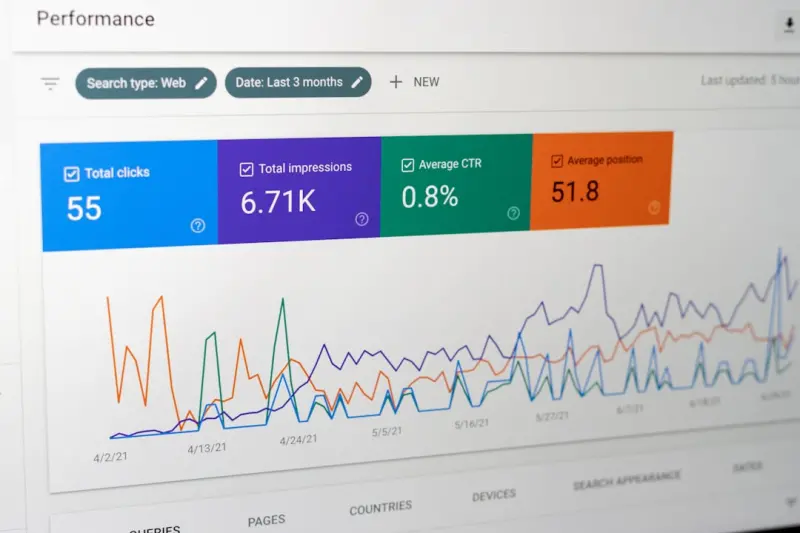
When most marketers think about Google SEO, the first things that come to mind are keyword research, backlink building, and on‑page optimization. Those tactics are still vital, but as a SaaS product leader I’ve discovered that the real gold lies deeper—in the data Google already gives us for free. Google Search Console (GSC) isn’t just a diagnostics tool; it’s a live telemetry dashboard that can inform product roadmaps, feature prioritization, and user‑experience decisions.
The “Telemetry” Mindset: Treating Search Data Like Product Metrics
In the world of SaaS, we obsess over activation rates, churn, and NPS scores. Yet, every time a user lands on a page via Google, they are already expressing intent. GSC captures that intent in granular form: impressions, clicks, average position, and, more recently, query‑level behavior signals. By overlaying these SEO metrics onto our existing product analytics, we can answer questions that were previously guesswork:
- Which feature pages are getting clicks but high bounce? That could indicate a missing onboarding step.
- Which search queries lead to trial sign‑ups? Those are the high‑value terms we should double‑down on.
- Where do users abandon the funnel after a SERP click? That tells us where the content‑to‑product handoff breaks.
Seeing search performance as a product KPI transforms GSC from a “technical SEO” checklist into a strategic planning tool.
Mapping Queries to Product Modules: The First Layer of Insight
Start by exporting the Performance report from GSC and grouping queries by the product module they target. For example, a project‑management SaaS might see clusters like:
- “task automation API” – targeting the integrations module
- “team dashboards pricing” – targeting the pricing page
- “how to set up SSO” – targeting the security settings docs
Once you have these clusters, cross‑reference them with your internal usage data (e.g., events tracked in Mixpanel or Amplitude). If the “task automation API” cluster shows a high click‑through rate but low activation in the product, you’ve uncovered a friction point that the SEO team can flag to product managers.
Prioritizing Content Work Based on Business Impact
Traditional SEO roadmaps prioritize topics by search volume alone. That approach can lead to “traffic for traffic’s sake.” By coupling GSC data with business outcomes, you can rank content initiatives by potential ROI:
- High‑Volume, Low‑Conversion Queries – These may be great for brand awareness but aren’t moving the needle on paid‑user acquisition.
- Medium‑Volume, High‑Conversion Queries – These are the sweet spots. Optimize the landing pages, add clearer CTAs, or introduce product tours.
- Low‑Volume, High‑Intent Queries – Long‑tail queries like “custom webhook for XYZ integration” often have the highest intent. Even a modest bump in rankings can deliver premium leads.
When you prioritize by conversion impact, every hour spent on SEO directly supports the revenue engine.
Leveraging Core Web Vitals Within Search Console Insights
Google’s emphasis on page experience is no longer optional. The Mobile Core Web Vitals Playbook teaches us how performance translates to revenue, but GSC makes it actionable. The Core Web Vitals report in GSC surfaces URLs that fail LCP, FID, or CLS thresholds, grouped by the queries that lead users there. By fixing those pages, you not only improve rankings but also lower friction for users already primed to convert.
Detecting Feature Gaps Through “Zero‑Click” Trends
Google’s shift toward zero‑click SERPs—answers, snippets, and the new Search Generative Experience—means users sometimes get the information they need without visiting your site. That can feel like a loss, but it’s a diagnostic signal. If a query like “how to create a workflow in [Your SaaS]” triggers a rich snippet, it tells you that Google believes you already have authoritative content on that topic.
Take two actions:
- Audit the snippet content and compare it against your product’s actual capabilities. If there’s a mismatch, you have a feature gap you can prioritize.
- Enhance the on‑page experience by adding a “Learn more” callout that directs users from the snippet to a deeper guide or a free trial.
This feedback loop keeps your product roadmap aligned with real‑world user questions.
Turning Seasonal Search Spikes Into Product Launch Opportunities
GSC’s Search Analytics includes a date‑range filter. By reviewing seasonal spikes—think “quarterly reporting templates” or “end‑of‑year data export”—you can anticipate demand for new features or content upgrades. If you notice a recurring surge every October, consider rolling out a targeted feature update or a timed webinar to capture that traffic.
Cross‑Functional Reporting: The SEO‑Product Dashboard
To make GSC data truly useful, embed it into a shared dashboard that product, growth, and support teams can access. Here’s a simple structure:
| Metric | Source | Actionable Insight |
|---|---|---|
| Top Queries with >50% CTR but <30% conversion | GSC + Product Analytics | Improve landing page copy or add in‑product demos. |
| Pages with Core Web Vitals failures & high impressions | GSC Core Web Vitals | Prioritize performance fixes for high‑traffic pages. |
| Zero‑click queries that surface your brand | GSC Rich Results | Assess content gaps or feature mismatches. |
| Seasonal query spikes | GSC Date Filter | Schedule feature releases or targeted campaigns. |
By surfacing these metrics in a single view, you eliminate silos and ensure that every team is speaking the same data‑driven language.
Case Study: From Search Insight to Product Feature
At a mid‑size SaaS I consulted for, the GSC Performance report showed a persistent query: “custom report templates for [product name]”. Users were clicking through, but the conversion funnel stalled at the “Reports” page. The product team discovered that the existing reporting module lacked template flexibility.
We took three steps:
- Validate demand by confirming the query’s steady impression volume and a CTR above 12%.
- Prototype a template builder based on the most common attributes users searched for.
- Launch an SEO‑optimized landing page that highlighted the new feature, using the same query as the focus keyword.
Within two months, the page’s average position improved from 12 to 3, the CTR jumped to 22%, and the new feature contributed a 7% lift in trial sign‑ups. This is a textbook example of how GSC can directly fuel product innovation.
Best Practices for Making GSC a Habit
- Schedule a weekly “Search Review” meeting with product, growth, and SEO leads. Keep it under 30 minutes—focus on top‑changing metrics.
- Set alerts for dramatic drops in clicks or impressions. GSC allows custom email alerts; treat them like error logs.
- Tag URLs with campaign UTM parameters when you run experiments. This lets you trace the SEO impact on downstream events in your analytics platform.
- Document insights in a living knowledge base so future product managers can see why certain features exist.
Future‑Proofing: Preparing for AI‑Generated Search Results
Google’s AI‑driven search experiences are evolving fast. While we don’t have a crystal ball, a good rule of thumb is to keep your content structured and authoritative. Use schema markup to highlight product features, FAQs, and reviews. When Google pulls data for generative answers, it’s more likely to surface content that’s well‑structured and trustworthy.
In practice, that means:
- Implementing FAQ and How‑To schema on help‑center articles.
- Adding Product schema with brand, model, and pricing details.
- Maintaining an E‑E‑A‑T (Experience, Expertise, Authority, Trust) narrative across author bios and case studies.
These steps keep you in the driver’s seat, even as Google’s AI layer grows more prominent.
Wrapping Up: From Search Data to Product Growth
Google Search Console is more than a diagnostic for broken links or crawl errors. It’s a real‑time, user‑intent signal that, when married to product analytics, can illuminate blind spots, prioritize development work, and ultimately accelerate revenue. By treating GSC as a core component of your product‑management toolkit, you turn “SEO” from a siloed function into a growth engine that powers the entire SaaS business.

Laura Wilson is a freelance writer specializing in the dynamic and ever-evolving field of health. With a passion for translating complex medical information into accessible and engaging content, Laura brings a wealth of knowledge and a fresh perspective to topics ranging from preventative care and nutrition to cutting-edge research and innovative treatments.
Related Posts

Why Intent‑First SEO Is the Secret Sauce Behind Google Rankings
Learn why shifting from keyword obsession to intent focus is the key to sustainable Google rankings,... Read More

Riding the 2024 Google SEO Wave: Rose DesRochers’ Insider Take
Rose DesRochers breaks down 2024’s biggest Google SEO changes, from intent and AI to authority, of... Read More

Riding the 2024 Google SEO Wave: Rose DesRochers’ Insider Playbook
Rose DesRochers shares her insider playbook for 2024, revealing how intent, AI, and authority combin... Read More
Top Posts

Omnichannel Storytelling: Turning Every Touchpoint Into a Chapter of Your Brand
Learn to craft a seamless brand story that lives across social, email, web, and in‑store experiences, turning each customer interaction into a compelling chap...Read More

Google Discover SEO: A Hidden Growth Engine for SaaS
Discover how SaaS marketers can turn Google’s AI‑driven feed into a powerful acquisition channel by focusing on entity‑driven topics, compelling visuals, ...Read More

Conversational Commerce: Turning Messaging Apps into Sales Engines
Explore the rise of conversational commerce, learn to choose the right chat platform, design flow scripts, blend AI with human support, and measure success for ...Read More

Mobile-First Content Architecture: The Next SaaS SEO Frontier
A deep dive into building mobile-first content architecture for SaaS, covering navigation, internal linking, structured data, emerging Core Web Vitals, and a pr...Read More
0 Comments
Post Comment
You will need to Login or Register to comment on this post!