

When I first took the helm of SEO for a fast‑growing SaaS product, the biggest headache wasn’t keyword research or backlink acquisition—it was getting Google to actually see the pages we painstakingly built. A sprawling codebase, hundreds of feature‑specific landing pages, and a relentless release cadence meant that Google’s crawler was constantly playing catch‑up. That experience taught me one hard‑earned truth: mastering crawl budget is the silent engine behind sustainable organic growth.
Why Crawl Budget Matters for SaaS Companies
Unlike a blog or a small e‑commerce catalog, a SaaS website often resembles a living organism. New modules, API documentation, pricing tiers, and case studies appear almost weekly. Google assigns each domain a “crawl budget” – a combination of the number of URLs it will fetch per day and the time it will spend on your site. If you don’t steer that budget wisely, the engine can waste precious cycles on low‑value pages while ignoring the high‑impact pages that drive trials and sign‑ups.
Think of crawl budget as a finite amount of fuel you hand to a delivery driver. If you give them a map riddled with dead‑ends and redundant routes, they’ll never reach the premium customers waiting at the front door.
Audit Your Site’s Architecture First
Before you start tweaking server logs or adding meta tags, get a clear picture of your site’s hierarchy. A clean, shallow architecture does three things:
- Reduces depth: Important pages sit within three clicks from the homepage, making them easier for bots to discover.
- Eliminates orphan pages: Every page should be reachable via at least one internal link.
- Improves link equity distribution: Authority flows naturally to the pages that matter most.
Use tools like Screaming Frog, Sitebulb, or the Google Search Console “Crawl Stats” report to spot deep nests and dead‑ends. Then, restructure by consolidating duplicate landing pages, merging thin content, and flattening the hierarchy where possible.
Prioritize High‑Value URLs with Crawl Directives
Once you know where the bottlenecks are, it’s time to tell Google where to focus. The most effective levers are:
- Robots.txt: Block non‑essential paths (e.g., admin panels, staging subdomains, or autogenerated PDF downloads). Be careful not to block resources that power your UI – a single mis‑placed
Disallow: /js/can cripple rendering. - Noindex meta tag: Apply
noindex, followto low‑value pages like duplicate support articles or thank‑you pages. This removes them from the index while preserving link equity. - Canonical tags: Consolidate similar pages (e.g., pricing variations for different regions) under a single canonical URL to avoid dilution.
Remember: the goal isn’t to hide content but to signal “these pages are not worth my time today.”
Speed Is a Signal – Optimize Server Response Times
Google’s crawler respects the same performance standards it applies to users. A slow‑responding endpoint can dramatically shrink your crawl budget because the bot spends more time waiting for each request. Here’s how to keep the server humming:
- Implement HTTP/2 or HTTP/3 to multiplex requests.
- Leverage edge caching for static assets and API responses that don’t change per user.
- Adopt gzip/brotli compression for HTML, JSON, and CSS payloads.
- Monitor TTFB (Time To First Byte) – aim for sub‑200 ms on your core pages.
If you’re not sure where the latency spikes are, check the “Speed” section of Google Search Console or run a quick site audit to surface performance culprits.
Strategic Internal Linking – The Unsung Budget Booster
Every internal link you add is a tiny invitation for the crawler to explore. But quantity without quality can backfire – you might create a “link farm” that confuses the bot. Follow these best practices:
- Link from high‑authority pages: The homepage and top‑ranking blog posts usually carry the most link equity. Use them to surface new feature pages or case studies.
- Use descriptive anchor text: Avoid generic “click here.” Instead, write anchors that hint at the target’s purpose – “Enterprise API documentation” or “Secure single‑sign‑on overview.”
- Maintain a logical flow: Build content hubs where a pillar page links out to cluster articles, and each cluster links back. This mirrors the “topic cluster” model but is tuned for crawl efficiency.
When you’re looking for a real‑world example of partnership‑driven linking, take a look at how strategic partnership link building can amplify authority. The same principle applies internally – treat each department’s landing page as a partner that can lend link juice.
Leverage Sitemap Management Wisely
A well‑crafted XML sitemap is like a treasure map for Googlebot. However, an overloaded sitemap can become noise. Here’s a checklist:
- Include only canonical URLs: Duplicate or parameter‑laden URLs belong elsewhere.
- Set priority wisely: While Google says priority isn’t a ranking factor, it does affect crawl order. Assign higher priority to conversion‑centric pages (pricing, demo request, trial sign‑up).
- Keep it under 50,000 URLs: If you exceed this, split the sitemap into logical chunks (e.g.,
sitemap‑features.xml,sitemap‑resources.xml). - Update regularly: Automate sitemap generation as part of your CI/CD pipeline so new releases are reflected instantly.
Monitor Crawl Efficiency with Real‑Time Data
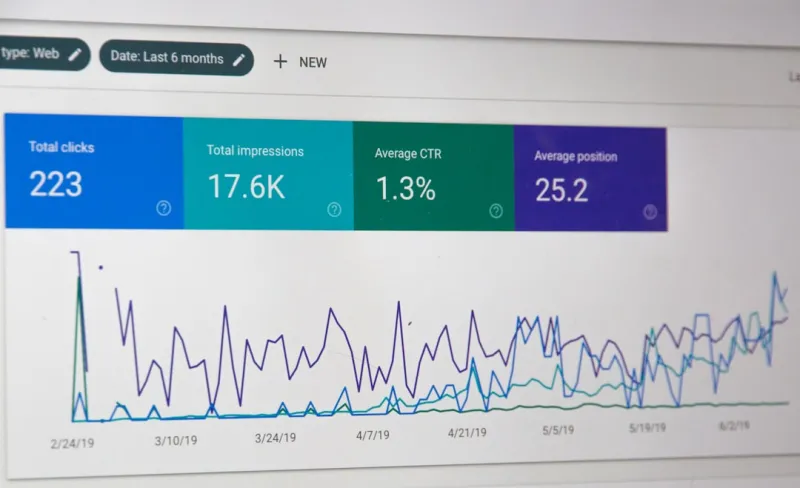
Google Search Console’s “Crawl Stats” tab shows two critical metrics: Pages crawled per day and Average response time. Set up alerts for sudden drops in either metric. A dip often signals a server issue, a new robots.txt rule, or an accidental noindex on a high‑value page.
Additionally, dive into the “URL Inspection” tool for a granular view. If a key product page shows “Crawled – currently not indexed,” investigate potential canonical conflicts or thin content flags.
Take Advantage of “Freshness” Signals
Search engines love fresh content, but they also hate chasing endless change. For SaaS sites, the sweet spot is to:
- Publish release notes as a dedicated, well‑structured section. Use schema.org
SoftwareSourceCodeorSoftwareApplicationmarkup to convey version history. - Refresh core landing pages quarterly – tweak copy, add new testimonials, or update screenshots.
- Keep a blog “product updates” series that links back to the main feature pages. This creates a natural, low‑effort internal link network that nudges crawlers toward the newest content.
Don’t Forget the “Non‑HTML” Assets
PDFs, whitepapers, and slide decks often hold high‑value, conversion‑oriented information. Yet, they’re easy to overlook in crawl budgeting. Treat them like any other page:
- Host them on a fast CDN.
- Compress them for quick download.
- Add descriptive
<title>and<meta description>tags within the PDF metadata. - Link to them from relevant HTML pages using clear anchor text.
These steps ensure Google sees them as assets worth indexing rather than dead weight.
Testing and Continuous Improvement
SEO isn’t a set‑and‑forget discipline, especially for a SaaS product that evolves weekly. Adopt a testing mindset:
- Run A/B tests on robots.txt rules: Temporarily block a low‑value section and observe crawl budget reallocation.
- Track “Crawl Budget Utilization” KPI: Divide pages crawled per day by the total eligible URLs. Aim for a steady upward trend as you prune and optimize.
- Review “Crawl Errors” monthly: Resolve 404s and server errors promptly to keep Google’s trust.
Bottom Line: Crawl Budget as a Growth Lever
In the noisy world of SEO, many teams obsess over backlinks, keyword density, or the latest AI‑driven content generator. While those tactics have merit, they’re ineffective if Google never reaches the pages you want to rank. By treating crawl budget as a strategic resource – mapping your site architecture, prioritizing high‑value URLs, speeding up server responses, and reinforcing a smart internal linking structure – you give Google the roadmap it needs to surface your best content at the right moment.
Apply these tactics, monitor the results, and you’ll watch your SaaS site climb the SERPs not just because it has great content, but because the search engine can actually see it.

Robert Mathews is a professional content marketer and freelancer for many SEO agencies. In his spare time he likes to play video games, get outdoors and enjoy time with his family and friends.
Related Posts

Unlocking the Power of Intent‑First SEO: Practical Tips for Modern Marketers
Explore practical intent‑first SEO tips that transform traffic into engaged visitors. Learn how to... Read More

Hyperlocal SEO: Turning Neighborhood Signals into Search Power
Learn how to transform neighborhood signals into SEO gold. From hyperlocal keyword mapping to commun... Read More

The 2024 SEO Playbook: Rose DesRochers’ Insider Secrets for Intent, AI, and Authority
Rose DesRochers shares her 2024 SEO playbook, blending intent, AI, and authority tactics to boost ra... Read More
Top Posts

Mapping Search Intent to On‑Page SEO: From Keywords to Content Architecture
Learn to map user intent to your page’s architecture, optimize headings, schema, and internal links, and boost relevance in today’s intent‑driven search l...Read More
SEO News Roundup: How AI, Contextual Ranking, and Core Web Vitals Are Redefining the Game
Rose DesRochers breaks down this week’s SEO news, from AI-powered SERP changes to new contextual ranking and Core Web Vitals updates, delivering actionable ti...Read More

Beyond Keywords: Leveraging Google’s Entity Graph for SaaS SEO Success
Google’s entity graph is redefining how SaaS content ranks. This post explains the shift from keyword‑centric SEO to concept‑driven strategies and provide...Read More

Crawl Budget Mastery: How Fast‑Growing SaaS Brands Stay Visible
A deep dive into crawl budget strategies for SaaS, showing practical steps to keep search engines focused on your most valuable content as your site scales....Read More
0 Comments
Post Comment
You will need to Login or Register to comment on this post!