

When most marketers think about SEO, they picture keyword research, backlinks, and on‑page copy. Rarely do they pause to consider the silent powerhouse humming in the background of every page: the images. In an era where visual search engines like Google Lens and Pinterest Trends are reshaping discovery, a well‑optimized image can be the difference between a page that languishes in obscurity and one that rockets to the top of the SERPs. This guide dives deep into the art and science of image SEO, giving you a roadmap to turn every visual asset into a traffic‑generating asset.
Why Images Matter More Than You Think
Search engines have evolved from text‑only crawlers to sophisticated visual analysts. Google’s Vision AI can now interpret color palettes, object shapes, and even contextual relevance within an image. This means that an image isn’t just a decorative element—it’s a piece of content that can be indexed, ranked, and displayed in dedicated visual SERPs. For SaaS companies, this opens a new frontier: potential customers can discover your product by searching for screenshots, UI mockups, or infographics, all without typing a single word.
Start With the Right Foundations: File Naming & Alt Text
Before you even think about compression or schema, ensure your file names and alt attributes speak the language of both users and crawlers. A generic filename like IMG_1234.png tells nobody anything. Instead, rename files to reflect the content and target keyword, e.g., crm-dashboard-analytics-report.png. The alt text should be concise yet descriptive, incorporating primary keywords without sounding forced. Remember, alt text also serves accessibility purposes, so make it useful for screen readers.
Optimize File Size Without Sacrificing Quality
Page speed remains a core ranking factor, and oversized images are notorious speed killers. Use modern formats such as WebP or AVIF, which deliver superior compression compared to traditional JPEG or PNG. Tools like ImageOptim, TinyPNG, or native CMS plugins can batch‑process images, shaving off kilobytes while preserving visual fidelity. Aim for images under 150 KB for most use cases, and always test with PageSpeed Insights to ensure you haven’t crossed a threshold that would hurt your Core Web Vitals.
Leverage Structured Data to Amplify Visibility
Beyond basic alt tags, structured data gives search engines richer context. While many have explored FAQ schema, image‑specific schemas like ImageObject, Product with associated images, and VideoObject (when you embed video thumbnails) can surface your visuals in rich results. Implement JSON‑LD snippets directly in your page head, and validate them with Google’s Rich Results Test to ensure they’re eligible for enhanced SERP features.
Harness the Power of Image Sitemaps
Google recommends submitting an image sitemap if your site relies heavily on visual content. An image sitemap is a simple XML file that lists image URLs, titles, and captions, making it easier for crawlers to discover and index your visuals. If you’re already using a regular sitemap, you can embed image entries within it—no need for a separate file unless you prefer to keep them distinct. This practice is especially valuable for SaaS platforms with extensive documentation, tutorials, and UI screenshots.
Implement Responsive Images for Mobile‑First Indexing
Mobile users now dominate web traffic, and Google’s mobile‑first indexing means that the mobile version of your site is the primary source for ranking signals. Use the srcset and sizes attributes to serve appropriately sized images based on the viewer’s device. This not only improves load times on smartphones but also signals to Google that your page delivers a high‑quality user experience across all screen sizes.
Tap Into Visual Search Platforms
Platforms like Pinterest, Instagram, and even TikTok have their own search algorithms that heavily prioritize images. By optimizing your pins and reels with keyword‑rich descriptions, hashtags, and proper alt text, you can capture traffic from users who never even type a query into Google. For SaaS businesses, creating shareable infographics that illustrate key product benefits can act as both a brand‑building tool and a visual SEO asset.
Turn Old Content Into Image Gold
Audit your existing blog posts and landing pages for under‑optimized images. A simple update—renaming files, adding descriptive alt text, compressing files, and adding structured data—can breathe new life into stale pages. This “content refresh” technique often yields faster ranking gains than publishing brand‑new content because the page already has domain authority. Pair this with a strategic internal linking boost, and you’ll see a compounding effect on crawl efficiency.
Internal Linking: A Visual Perspective
Just as you interlink textual content, you can also create a visual network of related images. Use rel="canonical" tags for duplicate images, and ensure that each image appears in at least one contextual link. For example, an infographic on “Data‑Driven SaaS Growth” can be linked from multiple blog posts discussing related topics. This not only improves crawl budget usage—something highlighted in Crawl Budget Mastery—but also signals thematic relevance to search engines.
Measure Success with the Right Metrics
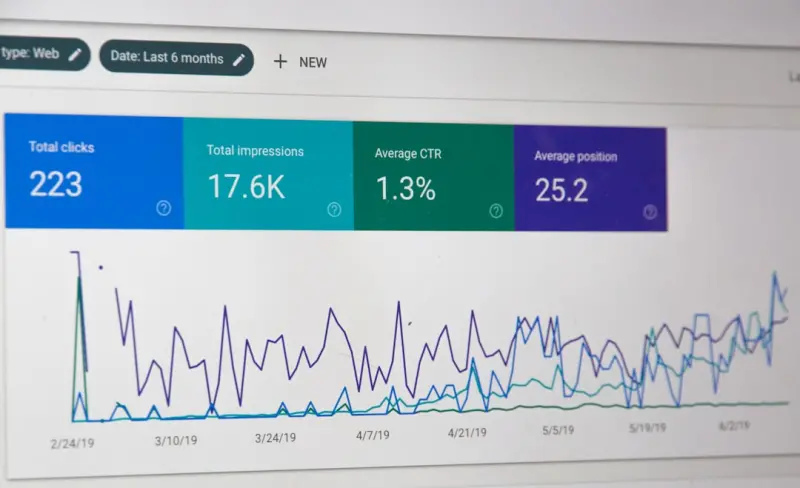
Traditional SEO metrics—organic traffic, keyword rankings, and backlinks—still matter, but image SEO adds new dimensions. Track impressions and clicks from Google Image Search via Google Search Console’s “Performance” report. Monitor the “Pages” tab to see which URLs are driving image traffic, and cross‑reference with your analytics platform to understand how visual visitors behave on your site. An increase in image-driven sessions often correlates with higher engagement rates, as users are typically further along the discovery funnel.
Future‑Proofing: AI‑Generated Visuals and Ethical Considerations
AI tools like DALL·E and Midjourney enable rapid creation of custom graphics. While these can speed up content production, ensure that generated images are unique and not overly similar to existing copyrighted works. Search engines may penalize duplicate or low‑quality visuals. Additionally, maintain transparency by adding descriptive alt text that clarifies the image’s purpose, especially if the visual is AI‑generated and may contain abstract elements.
Wrap‑Up: Your Image SEO Checklist
- Rename files to include target keywords.
- Write concise, descriptive alt text that serves both SEO and accessibility.
- Compress images using WebP or AVIF and keep sizes under 150 KB.
- Implement structured data like ImageObject JSON‑LD.
- Submit an image sitemap to aid discovery.
- Use srcset and sizes for responsive delivery.
- Leverage visual platforms such as Pinterest for supplemental traffic.
- Refresh old content with updated image SEO.
- Connect images through internal linking to boost crawl efficiency.
- Track image impressions in Search Console and adjust strategy.
- Stay ethical with AI‑generated visuals and maintain uniqueness.
By treating images as first‑class citizens in your SEO strategy, you unlock a hidden reservoir of traffic that many competitors overlook. It’s not just about looking good—every optimized visual is a signal to search engines, a gateway for users, and a catalyst for growth. Start implementing these tactics today, and watch your organic visibility expand beyond the traditional text‑only horizon.

As a passionate freelance writer, Paige Magarrey is dedicated to bringing new perspectives and raising awareness through her work. With her expertise and creative approach, Paige strives to engage readers and deliver valuable content that resonates with audiences.
Related Posts

Tapping TikTok: SEO Tips for Short‑Form Video Dominance
Short‑form video is reshaping search. Learn proven SEO tactics for TikTok, from keyword‑rich cap... Read More

Unlock the SEO Power of Your SaaS Knowledge Base
Learn why your SaaS knowledge base is a hidden SEO gem and get a step‑by‑step guide to optimize ... Read More

Mastering Intent‑First SEO: Actionable Tips for Modern Marketers
Learn why intent‑first SEO is a game‑changer, how to build an intent‑focused framework, and th... Read More
Top Posts

Why Intent‑First SEO Is the Game‑Changer for Google SEO in 2026
Explore why intent‑first SEO dominates Google rankings in 2026 and learn practical steps to align content with user purpose for lasting organic growth....Read More

Designing an SEO‑First WordPress Theme: A Developer’s Playbook
A step‑by‑step guide to crafting an SEO‑friendly WordPress theme from architecture to caching, ensuring speed, schema, and future‑proof performance....Read More

Riding the Wave of Google’s AI‑Powered Algorithm Shifts: A SaaS Playbook
Google’s algorithm now runs on advanced AI models, demanding SaaS marketers shift from keyword tricks to semantic depth, structured data, and real‑world uti...Read More
Zero‑Click Optimization: How to Own the SERP Snippet and Still Drive Business
Zero‑click results are no longer a nightmare for marketers; they’re a prime real‑estate opportunity. This post outlines a step‑by‑step playbook to cap...Read More
0 Comments
Post Comment
You will need to Login or Register to comment on this post!