

The overlooked power of visual search
When most marketers think about SEO, the conversation instantly drifts to keywords, backlinks, and content depth. I’ve learned that the next frontier lives in the images we publish. Visual search engines—Google Lens, Bing Visual Search, and even Pinterest Lens—are redefining how users discover products, ideas, and inspiration without typing a single word. By aligning our visual assets with search intent, we open a new channel that can drive traffic, brand awareness, and conversions. The key is treating each image as a mini‑landing page: it needs a clear purpose, contextual relevance, and technical optimization. In my own projects, a single well‑optimized product photo has generated thousands of impressions that never would have appeared in a traditional text‑based query. This shift isn’t a gimmick; it’s a fundamental change in the way search engines interpret the web. Embracing visual SEO today positions your brand ahead of competitors who are still stuck in the text‑only mindset.
How to audit and optimize image assets
Before you can rank in visual search, you must know exactly what you have and where the gaps exist. I start every visual audit with a simple spreadsheet that logs every image URL, file size, dimensions, alt text, and placement on the page. Tools like Screaming Frog or Sitebulb can export this data in minutes, letting you spot oversized files that slow down Core Web Vitals or missing alt attributes that hurt accessibility. Once the inventory is complete, prioritize images that are high‑traffic or high‑value—think product photos, infographics, and brand‑centric visuals. Compress files using modern formats like WebP, but keep a fallback JPEG for older browsers. Then rewrite alt text to be descriptive, concise, and keyword‑rich without stuffing. Remember, alt text isn’t just for SEO; it’s the primary way screen readers convey information, so a thoughtful description improves the experience for all users. By systematically cleaning up your image library, you lay the groundwork for higher visibility in both traditional SERPs and visual‑specific results.
Structured data for images and product photos
One of the most underrated tricks in visual SEO is leveraging schema markup to give search engines explicit signals about your images. Adding structured data such as ImageObject, Product, or Recipe schema tells Google exactly what the image represents, its dimensions, and even licensing information. When done correctly, Google can surface your visuals directly in rich results, carousel feeds, or the new “Visual Card” format. For e‑commerce sites, the Product schema paired with high‑resolution images can trigger the coveted “Buy Box” in image packs, driving click‑throughs straight to the checkout. Implement the markup using JSON‑LD in the page head, and validate it with Google’s Rich Results Test. By speaking the language of the search engine, you reduce the guesswork and increase the likelihood that your images earn prime real‑estate on the SERP.
Harnessing Google Lens for brand discovery
Google Lens isn’t just a mobile camera shortcut; it’s a powerful discovery engine that connects visual cues to brand intent. When a user snaps a photo of a product, a piece of furniture, or even a pattern, Lens can surface related items, reviews, and buying options. To capture that traffic, ensure your brand’s visual assets are publicly indexed and tagged with consistent naming conventions. Use descriptive file names like brand‑name‑summer‑floral‑dress‑blue.jpg rather than generic IMG_1234.jpg. Additionally, embed location data and brand logos within the image metadata (EXIF) where appropriate. This tiny detail can tip the algorithm toward recognizing your brand in Lens queries. I’ve seen campaigns where a simple Instagram post, optimized for Lens, generated a surge of organic traffic from users who never typed the brand name at all. Treating Lens as an extension of your SEO strategy expands your reach into the growing “search by photo” habit that’s rapidly becoming mainstream.
Building a visual content hub that fuels SEO
Just as we create blog clusters around keyword themes, we can construct visual hubs that organize related images, infographics, and videos into a cohesive ecosystem. Start by identifying core visual topics that align with your audience’s interests—think “DIY home office setups” or “seasonal fashion palettes.” Then develop a pillar page that introduces the theme and links out to a gallery of supporting assets, each optimized with its own alt text, schema, and contextual copy. This internal linking structure not only helps crawlers discover every visual asset but also distributes link equity throughout the hub. I often pair these hubs with downloadable PDFs or interactive tools, turning the visual experience into a deeper engagement funnel. When you treat images as content nodes rather than decorative afterthoughts, you create multiple entry points for search engines and users alike, dramatically increasing the chances of ranking in both image and web search.
Keyword clustering for image intent
Keyword research isn’t just about text; it also informs the language users employ when searching by image. Tools like Ahrefs or Semrush now provide “image keyword” suggestions that reveal phrases such as “blue floral dress photo” or “vintage lamp close‑up.” Group these terms into clusters based on visual intent—product, style, color, or usage scenario. For each cluster, craft a set of images that directly answer the query, and align the file name, alt text, and surrounding copy with the clustered keywords. This approach mirrors the content‑topic clustering strategy that powers topical authority, but it’s applied to the visual domain. In practice, I’ve seen a single “summer outfit” cluster lift the visibility of five separate product images, each ranking for a specific long‑tail visual query. By thinking in terms of image intent clusters, you can systematically expand your visual footprint without creating redundant content.
Internal linking with image galleries
Internal linking isn’t limited to text anchors; image galleries can serve as powerful navigational signals when set up correctly. Wrap each thumbnail in an HTML link that points to a dedicated page optimized for a specific visual keyword. Use descriptive anchor text in the surrounding caption, such as “Explore our sustainable bamboo furniture collection.” This creates a clear path for both users and crawlers, distributing link equity to image‑focused landing pages. Additionally, implement breadcrumb trails and related‑image widgets that suggest next steps, keeping visitors engaged longer. I’ve found that a well‑structured gallery can increase the average time on site by 30% and improve crawl depth, both of which are positive signals to Google’s algorithm. Treat each visual asset as a potential SEO landing page, and you’ll unlock hidden ranking opportunities that pure text pages often miss.
Measuring ROI of visual SEO with analytics
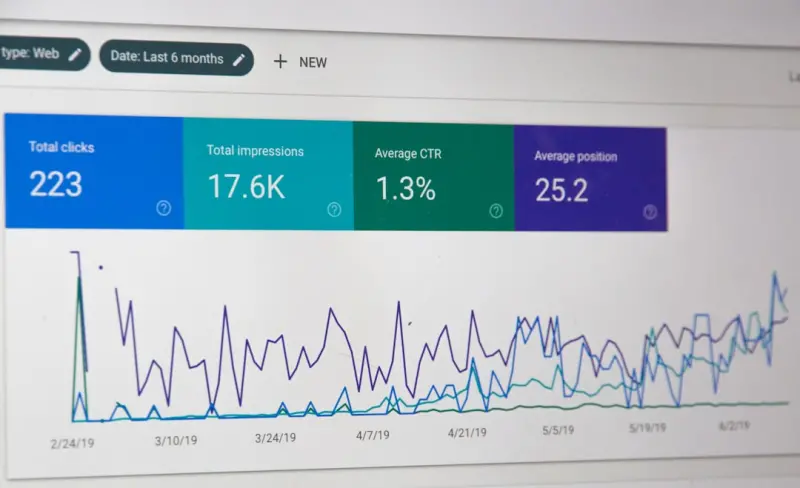
To justify the time spent on visual optimization, you need concrete metrics. Set up Google Search Console filters for “image” queries to monitor impressions, clicks, and average position. Complement this with Google Analytics event tracking that records image clicks, lightbox opens, and downloads. By assigning a monetary value to these actions—whether it’s a product view, a lead capture, or a direct sale—you can calculate the ROI of each visual asset. I also recommend A/B testing image variants: test different file formats, aspect ratios, or overlay text to see which version drives higher engagement. Over time, the data will reveal which visual topics deliver the most traffic and revenue, allowing you to prioritize future optimization efforts. Remember, visual SEO is a long‑term play; trends may shift, but the underlying data will always guide you toward the most profitable visual strategies.
Future‑proofing: AR and 3D model SEO
Augmented reality (AR) and 3D models are rapidly moving from novelty to necessity, especially for retail and real‑estate brands. Search engines have begun indexing .glb and .usdz files, offering the potential for “3D carousels” in image search. To stay ahead, start by creating lightweight 3D assets and embedding them with the model-viewer tag, which Google can crawl. Pair each model with comprehensive schema.org/3DModel markup, describing the object’s dimensions, material, and use case. While this may seem advanced, early adopters are already seeing their products appear in immersive SERP experiences, driving higher conversion rates. By investing in AR‑ready visual content now, you position your brand to capture the next wave of search behavior, where users expect to interact with products before buying. It’s an investment that aligns visual SEO with emerging technology trends, ensuring your visibility remains cutting‑edge.
Quick checklist for visual SEO success
Wrap up your visual SEO efforts with a concise checklist to keep every detail in check:
- Rename image files with descriptive, keyword‑rich names.
- Compress using WebP or AVIF while preserving quality.
- Write concise, accurate alt text that reflects intent.
- Implement ImageObject or Product schema via JSON‑LD.
- Include location and brand metadata for Lens discovery.
- Organize images into thematic hubs with internal linking.
- Track image performance in Search Console and Analytics.
- Test AR/3D models for emerging SERP features.
By ticking off each item, you ensure that no aspect of visual optimization is overlooked. Consistency is key; even small improvements compound over time, turning a modest image library into a powerhouse of organic traffic. Keep revisiting the checklist quarterly, and you’ll stay ahead of algorithm updates and user behavior shifts, cementing visual search as a core pillar of your overall SEO strategy.

Becky Putman is an Ottawa-based freelance writer and marketing professional with a passion for storytelling, animals, and community involvement. She enjoys creating engaging content that informs, inspires, and connects with readers.
Related Posts

Intent‑First SEO Secrets: Boost Your Rankings in 2026
In 2026, mastering Intent‑First SEO is the fastest route to authority. Rose shares practical steps... Read More

Unlocking the Power of Semantic Content Hubs for SaaS SEO
Discover why semantic content hubs are the new SEO catalyst for SaaS brands, and get a step‑by‑s... Read More

Trending SEO Tips for 2024: Rose DesRochers’ Insider Strategies
Rose DesRochers shares actionable 2024 SEO tactics—Core Web Vitals, AI content, schema, and moreâ€... Read More
Top Posts
Building an SEO Experiment Lab: From Hypothesis to Ranking Wins
Discover a step‑by‑step framework for turning SEO ideas into data‑backed experiments, from hypothesis creation to analysis, and see how a structured lab c...Read More

Intent, AI, and Authority: Rose DesRochers’ Fresh SEO Tips for 2024
Rose DesRochers shares her 2024 SEO playbook, emphasizing search intent, smart AI use, and authority building to drive rankings and real business results....Read More

The Mobile Core Web Vitals Playbook: From Metrics to Revenue
A deep dive into Mobile Core Web Vitals, this guide shows how LCP, FID, and CLS impact SEO and revenue, offering practical audits, optimization steps, and futur...Read More

Real‑Time Indexing: How SaaS Launches Can Ride Google’s Freshness Wave
Discover how real‑time indexing and Google’s freshness signal can turn every SaaS feature launch into an SEO boost, delivering immediate SERP visibility and...Read More
0 Comments
Post Comment
You will need to Login or Register to comment on this post!