
Why Google Search Console Is Your SaaS SEO Compass
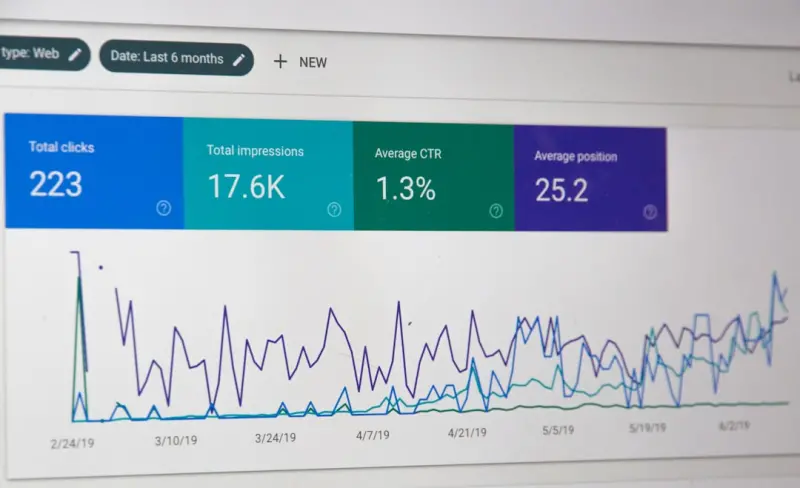
When I first started steering SaaS products into the search arena, I treated Google Search Console (GSC) like a fancy bookmark – a place to check whether my pages were indexed. Over the years it became clear that GSC is the single source of truth for any growth‑focused SEO strategy. It’s not just a reporting dashboard; it’s a real‑time telemetry system that tells you exactly where the search engine sees you, where it struggles, and where untapped opportunity lives.
Turning Raw Data Into Actionable Insight
The first step is to stop treating GSC as a passive log. Export the Performance report, slice it by queries, pages, countries, devices, and search appearance. Then ask yourself three brutal questions:
- What queries are bringing users to our site that we never optimized for? These “ghost keywords” are low‑effort wins – you already rank, you just need to polish the page.
- Which high‑traffic pages have a dismal click‑through rate (CTR)? A low CTR often signals a missed chance to improve meta titles and descriptions, or to add structured data that makes your result stand out.
- Where are we losing users after they click? Pair GSC data with Google Analytics to see bounce rates; a high bounce may hint at mismatched intent or a page load issue that GSC’s Core Web Vitals will also flag.
By converting each of these data points into a concrete task, you build a backlog that is both SEO‑centric and product‑aligned.
Prioritizing Queries With the “Intent Gap” Matrix
Most SaaS marketers chase high‑volume keywords that sound impressive on a spreadsheet. The Hyper‑Contextual SEO Playbook taught us that intent beats volume every time. In GSC, look for queries that sit in the “medium volume / high conversion” quadrant. These are typically long‑tail, problem‑solving searches that align with your product’s value proposition.
Plot these queries on a simple matrix:
- High volume, low conversion: Likely informational. Consider creating a guide or blog post that funnels readers toward a free trial.
- Low volume, high conversion: Niche but gold. Optimize the existing landing page or craft a dedicated micro‑site.
- High volume, high conversion: Your crown jewels – double down with A/B tested meta tags, rich snippets, and internal linking to boost rankings.
- Low volume, low conversion: Put on the back burner; revisit only if the keyword trend spikes.
Leveraging Search Appearance Signals
Google now surfaces a variety of SERP features: FAQ snippets, How‑To blocks, carousel cards, and even product schema for SaaS tools that offer free tiers. In GSC’s Search Appearance tab you can see exactly which features your pages are eligible for and where you’re actually showing up.
Take a systematic approach:
- Identify pages with zero appearances. Add the appropriate structured data (FAQ, How‑To, or Product) and re‑submit via the URL Inspection tool.
- Track CTR improvements. FAQ snippets often double CTR because they answer the question right on the results page.
- Audit for “missing” schema. Use the Structured Data & Interactive UX guide for implementation patterns.
Device Segmentation: Mobile‑First Isn’t Enough
GSC splits performance by device out of the box. While most SaaS brands focus on desktop vs. mobile, there’s a third, often overlooked segment: tablet. Your product’s pricing calculator may look perfect on a desktop but break on a tablet, causing a sudden drop in mobile‑tablet CTR.
Action steps:
- Run a device‑specific audit of Core Web Vitals. A “LCP” (Largest Contentful Paint) above 2.5 seconds on tablets is a red flag.
- Use responsive design breakpoints that consider the typical SaaS dashboard layout – often a two‑column grid that collapses poorly on tablets.
- Deploy a “device‑only” A/B test on meta titles to see if a tablet‑focused headline improves CTR.
International Expansion Through GSC’s Country Data
Most SaaS businesses start in English‑speaking markets, but the moment you see a steady stream of impressions from Germany, Brazil, or Japan, it’s a cue to localize.
Here’s a quick workflow:
- Export the Country report and sort by impressions.
- Pick the top three non‑English markets with >5 % of total impressions.
- For each market, create a language‑specific landing page, translate meta tags, and add hreflang annotations.
- Submit the new URLs through the URL Inspection tool to accelerate indexing.
When you monitor the “Average Position” metric for each country, you’ll quickly see the lift from proper localization.
Detecting Algorithmic Shifts Early
Google’s algorithm updates often manifest as a sudden dip in impressions or average position across a swath of queries. By setting up a simple weekly GSC snapshot and charting the metrics, you can catch these changes before traffic plummets.
My personal cheat sheet includes:
- Tracking “Core Web Vitals” trends – a new update may penalize sites with high CLS (Cumulative Layout Shift).
- Monitoring “Top Queries” for any that have shifted more than two positions in a single week.
- Cross‑referencing with industry newsletters to confirm whether the dip aligns with a known core update.
If you spot an anomaly, prioritize a quick technical audit (crawl errors, broken redirects, duplicate meta tags) before diving into content rewrites.
Building a “Search Console‑First” Content Calendar
Instead of brainstorming topics in a vacuum, let GSC dictate your editorial cadence. Follow these steps each month:
- Identify “impression‑only” queries. These are searches that bring users to your site but don’t result in clicks. They highlight a mismatch between SERP snippet and user intent.
- Craft content that directly answers those queries. Use the exact phrasing from the query in your H1 and throughout the copy.
- Leverage schema. If the query is a “how‑to,” embed a How‑To schema to increase chances of a rich result.
- Promote internally. Add contextual internal links from high‑authority pages to the new piece, passing link equity.
This loop ensures every piece of content is rooted in proven search demand, reducing the guesswork that plagues many SaaS blogs.
Automating Routine GSC Tasks
For fast‑moving SaaS teams, manual data extraction quickly becomes a bottleneck. The Google Search Console API lets you programmatically pull performance data, filter by dimensions, and feed the results into a BI tool like Looker or Power BI.
Key automations to consider:
- Daily “Top 10 Queries” dashboard. Alerts when any query’s CTR falls below a threshold.
- Weekly “Newly Indexed URLs” report. Spot orphan pages that need internal links.
- Monthly “Core Web Vitals” trend chart. Spot pages that have degraded after a recent UI overhaul.
Investing in this automation pays off quickly – you free up analysts to focus on strategy rather than data wrangling.
Case Study: Turning a 30 % CTR Decline Into a 2× Traffic Surge
One of our SaaS clients noticed a steady decline in CTR for their “pricing calculator” page. The GSC data revealed two issues:
- Impressions were rising for the query “SaaS pricing calculator,” but the page’s meta title still read “Free Tools – MyCompany.”
- The page lacked structured data, so it never appeared in the “FAQ” rich snippet slot.
We executed a three‑step fix:
- Rewrote the meta title to include the exact query: “SaaS Pricing Calculator – Instantly Compare Plans.”
- Added FAQ schema answering “How does the calculator work?” and “Can I export results?”
- Boosted internal linking from the blog post “Choosing the Right SaaS Plan,” passing additional authority.
Within two weeks, CTR jumped from 3 % to 7 %, and organic traffic to the calculator page doubled. This is a textbook example of how a data‑driven GSC approach can move the needle without any paid spend.
Integrating GSC Insights With Product Roadmaps
Search demand often foreshadows feature requests. If you see a surge in queries like “SaaS tool integration with Slack,” that signals a market need. Feed this data directly into your product backlog:
- Tag each query with a “feature‑potential” label.
- Prioritize high‑volume, high‑intent queries in the next sprint planning.
- Post‑launch, monitor GSC for a lift in impressions and CTR – proof that the feature resonates.
This creates a virtuous loop where SEO fuels product decisions, and new product features, in turn, generate fresh SEO opportunities.
Conclusion: Make GSC the North Star of Your SaaS SEO Strategy
Google Search Console is more than a compliance tool; it’s a strategic asset that can inform content, technical SEO, international expansion, and even product development. By treating its data as a live KPI dashboard, you turn raw numbers into a growth engine that scales with your SaaS business.

Paul Flynn is a versatile freelance writer equipped with a diverse skillset and a portfolio that reflects his wide-ranging interests and expertise. From crafting compelling website copy and engaging blog posts to delivering in-depth articles and meticulously researched reports, Flynn demonstrates a remarkable ability to adapt his writing style to suit various audiences and purposes.
Related Posts

Core Web Vitals: The Unsung Engine Driving Modern Google SEO Success
Learn why Core Web Vitals are essential for modern SEO, how to optimize LCP, FID, and CLS, and get a... Read More

Cracking Google Discover for B2B SaaS: A Playbook
Google Discover isn’t just a consumer feed—it’s a powerful, interest‑driven channel that B2B... Read More

The Intent‑First SEO Blueprint: Turning User Purpose Into Rankings
Learn the actionable steps to adopt Intent‑First SEO, from purpose mapping to continuous content a... Read More
Top Posts

Why Intent‑First SEO Is Dominating the Search Landscape
Intent‑first SEO is the hottest conversation in search today. Learn how aligning content with real user goals drives higher rankings, conversions, and long‑...Read More
Rethinking SEM Attribution for SaaS: From Clicks to Revenue
Traditional last‑click attribution undervalues paid search in SaaS. This guide walks you through building a revenue‑centric multi‑touch model, visualizing...Read More

Data‑Driven Link Building: From Insight to Authority
Learn how to convert SaaS product data, interactive tools, and research partnerships into powerful, high‑quality backlinks. This guide offers a step‑by‑st...Read More

Gamified Email Campaigns: Turning Newsletters into Interactive Experiences
Discover the power of gamified email campaigns: a step‑by‑step guide to turning ordinary newsletters into interactive experiences that boost engagement, cap...Read More
0 Comments
Post Comment
You will need to Login or Register to comment on this post!