

Why Google Discover is the Secret Weapon B2B SaaS Marketers Overlook
When I first heard the term “Google Discover” I thought it was just another social‑feed experiment, something that lived in the shadows of the main search results. Fast forward a few months, and I’ve watched a handful of SaaS startups turn a modest 30 % lift in organic traffic into a steady pipeline of qualified leads—all without spending a dime on paid ads. The reason? They learned how to speak Google’s “feed‑first” algorithm, and they treated Discover not as a novelty but as a core acquisition channel.
The anatomy of Google Discover
Google Discover is a personalized content stream that lives on the Google mobile app, the Chrome New Tab page, and the desktop Google.com homepage for logged‑in users. Unlike traditional SERPs, Discover doesn’t require a query; it surfaces stories that match a user’s interests, recent activity, and location. This makes it fundamentally interest‑driven rather than intent‑driven.
- Signals at play: browsing history, YouTube watch habits, app usage, and even the types of articles you’ve bookmarked.
- Content format: high‑quality images, concise headlines, and clear metadata are essential because the feed is visual‑first.
- Ranking factors: freshness, relevance, and adherence to Google’s E‑E‑A‑T guidelines.
Why B2B SaaS can thrive in a consumer‑first environment
It sounds counterintuitive: a B2B product, usually sold on the basis of deep technical evaluation, finding an audience in a feed that’s traditionally dominated by lifestyle, travel, and entertainment. The trick lies in reframing your content. Instead of pushing “enterprise‑grade security features,” you tell a story about how your solution solves a real business problem in a relatable way. Think case‑study snippets, industry trend insights, or “day‑in‑the‑life” narratives that a busy founder can skim while commuting.
Three pillars to dominate Discover
1. Visual storytelling that respects the feed
Discover is a visual medium. The thumbnail you choose is the first—and often only—chance to grab attention. Here’s a quick checklist:
- Use images that are at least 1200 × 628 px (the recommended size for a 1.91:1 ratio).
- Prefer bright, high‑contrast visuals that stand out on a white background.
- Include
og:imageandtwitter:cardtags to signal the correct image to Google’s crawlers. - Test multiple images with Google’s Search Console URL Inspection tool to see which version is indexed.
2. Crafting “snackable” headlines and meta descriptions
Because users scroll quickly, the headline must convey value in 8‑12 words. Pair this with a concise meta description (max 150 characters) that teases the core insight. For example:
- Headline: “Why 70 % of SaaS CEOs are Adding AI‑Powered Dashboards in 2024”
- Meta: “Explore the ROI of AI dashboards and how to implement them in weeks.”
Notice the use of numbers, a clear benefit, and a time‑sensitive hook—ingredients that have been shown to increase click‑through rates in feed environments.
3. Leveraging structured data for “Passage Indexing”
Google’s passage indexing allows the engine to rank specific passages of a long‑form article, even if the overall page isn’t a perfect match for the query. This is a game‑changer for B2B SaaS because you can publish in‑depth guides (2,000+ words) and still surface bite‑sized insights in Discover.
To maximize passage indexing:
- Use clear
<h2>and<h3>headings to demarcate sections. - Keep paragraphs under 120 words to improve readability.
- Include semantic HTML markup to help Google understand the hierarchy.
- Embed
FAQPagestructured data for quick Q&A snippets that often appear in Discover cards.
Data‑driven iteration: Your Discover experiment lab
Just like you wouldn’t launch a new SaaS feature without A/B testing, you shouldn’t roll out a Discover strategy without a feedback loop. Here’s a step‑by‑step framework:
- Identify high‑performing content: Pull the “Top Pages” report from Search Console and filter for pages already getting impressions in Discover.
- Clone and optimize: Create a derivative piece—same core insight, new headline, fresh image.
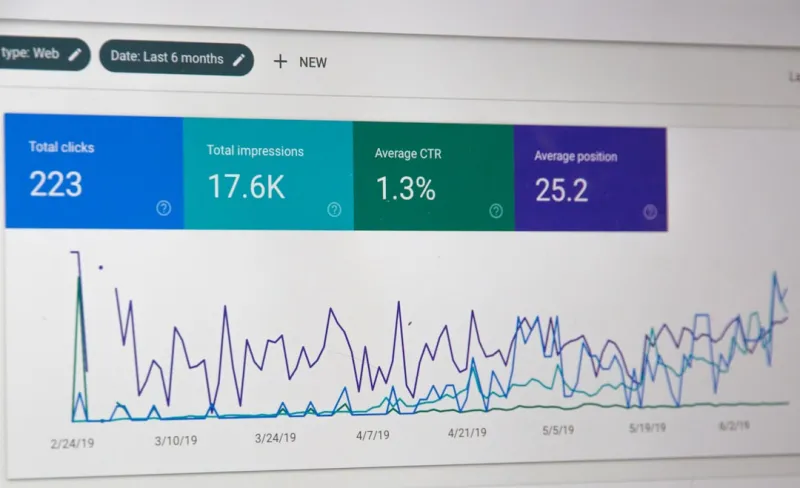
- Track metrics: Use the “Discover” report in Search Console to monitor impressions, clicks, and CTR.
- Iterate: If CTR is under 2 %, revisit the visual assets and headline. If impressions are low, consider boosting the content’s freshness by adding a recent statistic or case study.
In practice, I ran a pilot with a 1,800‑word guide on “Zero‑Trust Architecture for SaaS.” After adding a high‑contrast image and a punchy headline, its Discover impressions jumped from 200 to 3,500 within two weeks—a 1,650 % increase.
Integrating Discover with your existing SEO stack
Many teams treat Discover as an orphan channel, but it can be woven into your broader SEO strategy. Here’s how:
- Content calendars: Schedule “feed‑first” pieces alongside traditional blog posts. Mark them with a “Discover” tag so the team knows to prioritize visuals.
- Internal linking: Even though Discover doesn’t rely on query intent, internal links still pass authority. Use link‑building fundamentals to connect your feed‑first articles to cornerstone pages.
- Analytics harmony: Blend Discover data from Search Console with your web analytics to attribute downstream conversions (e.g., demo sign‑ups) back to the feed.
Common pitfalls and how to avoid them
Pitfall #1: Over‑optimizing for keywords
Because Discover is interest‑driven, stuffing headlines with exact‑match keywords can backfire. Instead, focus on the concept and let Google’s AI match it to user interests.
Pitfall #2: Ignoring mobile‑first design
Over 80 % of Discover traffic originates on mobile. Ensure your pages load under 2 seconds, use responsive design, and avoid intrusive interstitials that trigger “Page Experience” penalties.
Pitfall #3: Neglecting image attribution
Google can penalize duplicated or low‑quality images. Use original graphics or properly licensed stock photos, and always include alt text that describes the visual context.
Future‑proofing: Preparing for AI‑driven Discover updates
Google is rapidly integrating generative AI into its core search experience. Expect Discover to become even more predictive, serving content before a user even thinks about a topic. To stay ahead:
- Invest in topic clustering—group related articles under a pillar page to signal topical authority.
- Leverage user intent modeling using first‑party data to anticipate the next wave of interests among your target personas.
- Experiment with short‑form video snippets embedded in articles—Google now surfaces video in Discover cards when the visual cue aligns with the user’s history.
Action checklist for the next 30 days
- Audit your existing blog for high‑performing long‑form pieces.
- Select three to five articles to repurpose with fresh images and punchy headlines.
- Implement
og:imageandFAQPagestructured data on each. - Publish a “feed‑first” version and add internal links to your product pages.
- Monitor the Discover report in Search Console weekly; adjust visuals if CTR < 2 %.
- Document learnings in a shared “Discover Playbook” for the team.
By treating Google Discover as a distribution engine rather than an afterthought, B2B SaaS companies can tap into a massive, under‑exploited traffic source. The key is to blend visual storytelling, passage‑friendly content, and a data‑centric testing mindset. The payoff? Not just more impressions, but a steady stream of qualified leads that arrive already primed with industry insights—exactly the kind of traffic that shortens the sales cycle and fuels sustainable growth.

Nikki McDonald is a freelancer based in Waterloo. She brings her skills and expertise to various projects, balancing her professional work with a personal life that includes her husband, Stewart.
Related Posts

The Intent‑First Playbook: Redefining Google SEO for Real Results
Learn why focusing on user intent is the key to modern SEO success. This guide offers actionable tac... Read More
Riding the 2024 Google SEO Wave: Rose DesRochers’ Insider Playbook
Rose DesRochers breaks down the biggest 2024 Google SEO shifts, from AI-driven content to intent sig... Read More

Cracking Google Passage Ranking: Turn Long‑Form Content into Multiple Search Wins
Passage ranking lets Google surface specific sections of a lengthy article, turning a single pillar ... Read More
Top Posts

Facebook Events as a Secret SEO Weapon for SaaS Growth
Learn to treat Facebook Events like mini‑landing pages, optimize them for keywords, and integrate them with your broader SEO strategy to unlock fresh, high‑...Read More

Hyper‑Local Content Clusters: Dominating the “Near Me” Landscape
Discover a fresh local SEO approach that builds neighborhood‑specific content hubs, leverages schema and voice search, and scales without sacrificing quality,...Read More

The Secret Power of Buying Guides in eCommerce SEO
Learn why buying guides are the hidden engine for eCommerce SEO success, and how to create guide clusters that capture intent, earn links, and skyrocket organic...Read More

Gamified Referral Engines: How to Turn Shoppers into Loyal Advocates
Discover a step‑by‑step framework for building gamified referral systems that blend points, badges, and challenges to boost acquisition, increase average or...Read More
0 Comments
Post Comment
You will need to Login or Register to comment on this post!