

When I first stumbled onto Google Lens during a coffee‑shop demo, I realized we were standing at the edge of a seismic shift in how users discover content. Visual search isn’t just a novelty—it’s becoming a core component of the search ecosystem, and the on‑page elements that power it are still largely untapped. In this post I’ll walk you through a pragmatic framework for optimizing your pages for visual search, tying together image fundamentals, schema tricks, and user‑experience signals that Google’s algorithms already love.
Why Visual Search Deserves a Dedicated On‑Page Strategy
Search used to be a text‑first game: type a query, get a list of pages, click. Today, a photo snapped on a smartphone can launch a SERP of product listings, how‑to guides, and local business profiles—all without a single keystroke. This means the assets that sit on your page—images, videos, and even 3D models—are now first‑class ranking factors. Ignoring them is akin to building a skyscraper and forgetting to install windows.
Start with Image Foundations: Quality, Context, and Speed
Google’s visual algorithms evaluate three pillars when assessing an image:
- Technical excellence – crisp resolution, appropriate file format, and compressed size that won’t slow the page.
- Contextual relevance – the surrounding text, heading hierarchy, and file name must clearly signal what the image depicts.
- User experience impact – fast load times and proper responsive behavior keep visitors engaged, sending positive signals back to the crawler.
Here’s a quick checklist you can run on every high‑value image:
- Resize to the maximum display dimensions (no larger than needed).
- Save as
WebPor optimizedAVIFfor modern browsers. - Compress using a lossless tool that retains detail (e.g., ImageOptim or Squoosh).
- Name the file with descriptive, keyword‑rich terms (e.g.,
organic‑ceramic‑mug‑blue‑2024.webp). - Include a concise, unique
altattribute that mirrors the surrounding copy. - Wrap the image in a
figuretag with afigcaptionwhen appropriate.
Alt Text: From Accessibility Boilerplate to Ranking Asset
Too many teams treat alt as a checkbox for compliance. In the visual search era, it’s a prime opportunity to convey intent. Think of it as a miniature, SEO‑friendly headline for the image. A solid approach is the “5‑W” method:
- Who – Who is featured? (e.g., “artisan baker”)
- What – What is the object? (e.g., “hand‑crafted sourdough loaf”)
- Where – Where is it located or used? (e.g., “on a rustic wooden board”)
- When – Optional timing context (e.g., “fresh out of the oven”)
- Why – The purpose or benefit (e.g., “ready for a weekend brunch”).
Example: alt="Hand‑crafted sourdough loaf on a rustic wooden board, fresh out of the oven, perfect for weekend brunch". This sentence is both descriptive for screen readers and keyword‑rich for visual indexing.
Structured Data: Speak Google’s Language Directly
Beyond good alt text, you can amplify image relevance with schema.org markup. Google’s structured data guide demonstrates the broad possibilities, and the same principles apply to visual assets. For product pages, use Product schema with the image property pointing to the high‑resolution URL. For how‑to guides, the HowToStep type lets you attach step‑by‑step images that Google can surface in rich results.
Here’s a compact JSON‑LD snippet for a product image:
{
  "@context": "https://schema.org/",
  "@type": "Product",
  "name": "Eco‑Friendly Bamboo Cutting Board",
  "image": [
    "https://example.com/images/bamboo‑cutting‑board‑front.webp",
    "https://example.com/images/bamboo‑cutting‑board‑in‑use.webp"
  ],
  "description": "Sustainable bamboo board, 12×8 inches, knife‑friendly surface.",
  "offers": {
    "@type": "Offer",
    "priceCurrency": "USD",
    "price": "34.99",
    "availability": "https://schema.org/InStock"
  }
}
Embedding this tells Google that those images are not decorative fluff; they’re core product signals that can appear directly in visual SERPs.
Leverage Image Sitemaps for Faster Indexing
Just as you’d submit a traditional XML sitemap for URLs, you can create an <image:image> block for each page’s key visuals. This helps Google discover high‑value assets even if they’re hidden behind lazy‑load scripts. Combine this with a lastmod tag so the crawler knows when the visual content was refreshed.
Sample entry:
<url>
  <loc>https://example.com/organic‑kitchen‑tools</loc>
  <lastmod>2024-06-12</lastmod>
  <image:image>
    <image:loc>https://example.com/images/organic‑spoon‑set.webp</image:loc>
    <image:caption>Set of 5 organic bamboo spoons, perfect for stir‑frying</image:caption>
  </image:image>
</url>
Video Optimization: The Next Visual Frontier
While images dominate visual search, video content is quickly catching up. Google can surface short video clips in image‑style cards when the thumbnail matches a query. Treat each video like a mini‑page:
- Write a detailed, keyword‑rich
titleanddescriptionon the hosting platform. - Provide a
transcript—both for accessibility and for feeding textual signals to the indexer. - Mark up the video with
VideoObjectschema, includingthumbnailUrl,duration, anduploadDate. - Host the video on a fast CDN and enable
preloadfor the first frame.
Core Web Vitals Meet Visual Assets
Google’s ranking algorithm already weights Core Web Vitals (LCP, CLS, FID). Visual assets have a direct impact on these metrics. An oversized hero image can crush Largest Contentful Paint (LCP), while shifting layout dimensions cause Cumulative Layout Shift (CLS). The remedy?
- Implement
aspect‑ratioCSS or set explicitwidth/heightattributes on everyimgtag. - Adopt
lazy‑loadfor below‑the‑fold visuals, but prioritize above‑the‑fold content withpreload. - Use a
srcsetandsizesattribute to serve the optimal resolution per device. - Consider
responsive imagesvia thepictureelement to deliver WebP/AVIF where supported.
When you align visual asset strategy with Core Web Vitals, you get a double win: happier users and higher rankings.
Integrating Visual SEO with Topic Clusters
Most on‑page SEO frameworks emphasize pillar content and supporting articles. Visual SEO can be woven into that architecture by assigning a “visual anchor” to each cluster. For example, a pillar page about “Sustainable Kitchen Tools” could host a high‑resolution, schema‑rich gallery that the supporting posts reference via rel="canonical" links and internal anchors. This reinforces topical relevance while giving Google a single, authoritative image source to index.
Tip: Use descriptive anchor text when linking to the visual hub, such as “view the full sustainable kitchen tools gallery”. This reinforces keyword signals for the visual asset without over‑optimizing.
Measuring Success: Visual Search Metrics That Matter
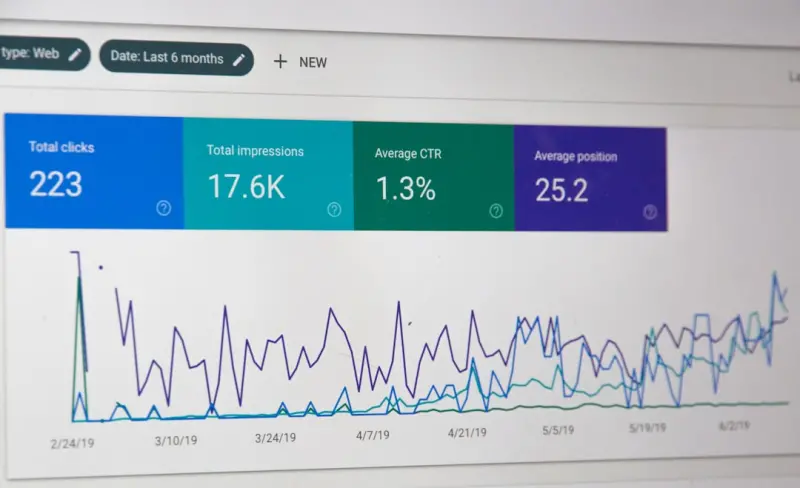
Traditional SEO dashboards focus on impressions, clicks, and average position. For visual search, add these KPIs:
- Image impressions – Available in Google Search Console under the “Performance” > “Search Appearance” > “Image” tab.
- Click‑through rate (CTR) for images – Compare to overall page CTR to gauge visual appeal.
- Engagement after visual click – Bounce rate, session duration, and conversion metrics for users who arrived via an image.
- Core Web Vitals specific to visual elements – LCP measured on the hero image, CLS incidents caused by lazy‑loaded assets.
Track these metrics monthly, and iterate on image compression, alt text, and schema as needed.
Future‑Proofing: Preparing for Augmented Reality (AR) SERPs
Google is experimenting with AR overlays that let users visualize products in their space directly from search results. While still early, the groundwork is similar to visual SEO: provide high‑resolution 3D models, annotate them with ImageObject or emerging 3DModel schema, and host assets on a fast CDN. By building a pipeline now, you’ll be ready when AR SERPs become mainstream.
Putting It All Together: A 7‑Step Action Plan
- Audit existing visual assets. Identify high‑traffic pages lacking optimized images.
- Apply the image fundamentals checklist. Resize, compress, rename, and add precise alt text.
- Implement schema markup. Use
Product,HowTo, orArticletypes as appropriate. - Generate an image sitemap. Submit it via Google Search Console.
- Optimize video content. Add transcripts and
VideoObjectmarkup. - Align with Core Web Vitals. Set dimensions, use
srcset, and preload critical visuals. - Monitor visual performance. Track image impressions, CTR, and Vitals in Search Console.
By following these steps, you’ll transform static assets into powerful ranking signals that capture users’ eyes—and clicks—before they even type a word.
Final Thoughts
Visual search isn’t a side project; it’s the next evolution of on‑page SEO. When you treat images, videos, and emerging 3D assets as first‑class content—complete with technical optimization, contextual relevance, and structured data—you’re not just future‑proofing your site, you’re opening a new traffic channel that rivals traditional text‑based queries. The landscape is still forming, and the early adopters will reap the biggest gains. So roll up your sleeves, audit those hero images, and start speaking Google’s visual language today.

Steven Philips loves the great outdoors and is all about getting more folks to appreciate and protect our planet by showcasing its stunning beauty. Steven calls Canada home as he resides in British Columbia with his wife and 3 kids.
Related Posts

The Art of Semantic On‑Page SEO: Elevate Rankings with Structured Content
Learn to harness semantic HTML, strategic internal links, and optimized media to supercharge on‑pa... Read More

Beyond Clicks: Harnessing Accessibility and Interaction for On‑Page SEO Success
Learn why making your site accessible and interaction‑rich isn’t just good ethics—it’s a pow... Read More

Mastering On-Page SEO for Visual Search: A Practical Guide
Discover actionable strategies to optimize images for AI‑driven visual search, from naming convent... Read More
Top Posts
Headless WordPress SEO: Future‑Proofing Your Rankings
Discover a practical roadmap for maintaining and enhancing SEO in a headless WordPress setup, from canonical tags to Core Web Vitals, schema, and semantic conte...Read More

Micro‑Influencer Networks: The New Engine for Authentic Digital Growth
Explore the power of micro‑influencer networks, from finding niche creators to measuring authentic ROI, and learn how AI matchmaking will shape the next era o...Read More

Reimagining Enterprise Search with Hybrid AI Retrieval
Explore a fresh take on AI search that blends traditional indexing with neural models, enabling precise, context‑rich results across languages and departments...Read More

Turning the eCommerce Funnel Into a Real‑Time Revenue Engine
A fresh look at eCommerce marketing: leverage micro‑moments, AI recommendations, shoppable video, and gamified loyalty to turn each touchpoint into a real‑t...Read More
0 Comments
Post Comment
You will need to Login or Register to comment on this post!